Windows XP Windows 7 Windows 2003 Windows Vista Windows 綜合教學 Linux 系統教學
Windows 10 Windows 8 Windows 2008 Windows NT Windows Server 電腦軟體教學

Win7 Explorer.exe 應用程式錯誤三大解法:360 修復、IE 重置、CMD 註冊 DLL

編輯:Windows 7 系統介紹

Win7 隨機彈出「Explorer.exe 應用程式錯誤,應用程式無法正常啟動」,提供三種修復方案:① 360 安全衛士人工服務搜尋「Explorer 總是報錯」一鍵修復;② IE 瀏覽器「網際網路選項」→「進階」→「重置」並勾選刪除個人設定;③ CMD 執行批次註冊系統 DLL 指令。


方法一:360 人工服務(最簡單)

  1. 安裝 360 安全衛士 → 點擊「人工服務」。
  2. 搜尋「Explorer 總是報錯」→ 點擊「立即修復」。

方法二:IE 重置

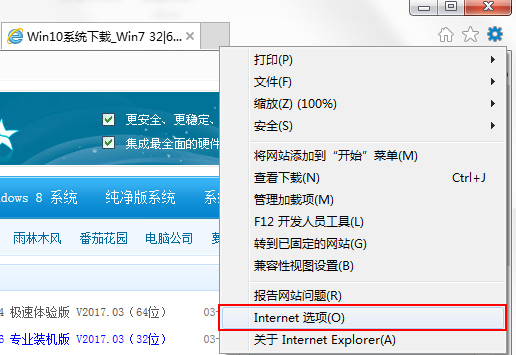
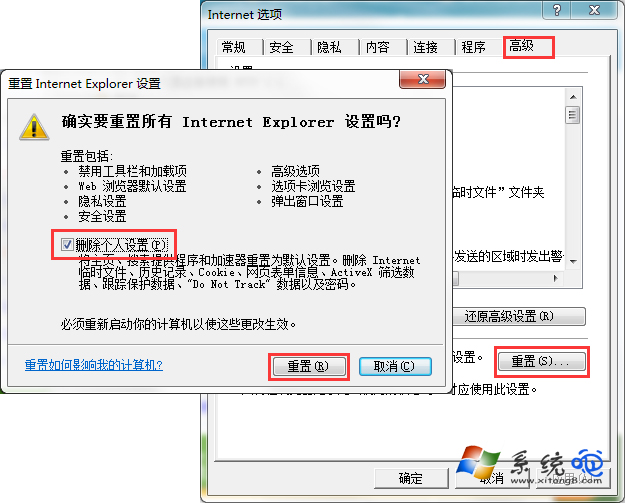
  1. IE → 工具 → 網際網路選項 → 進階 → 重置。
  2. 勾選「刪除個人設定」→ 重置 → 依提示完成。

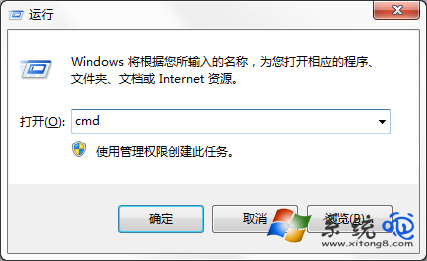
方法三:CMD 批次註冊 DLL

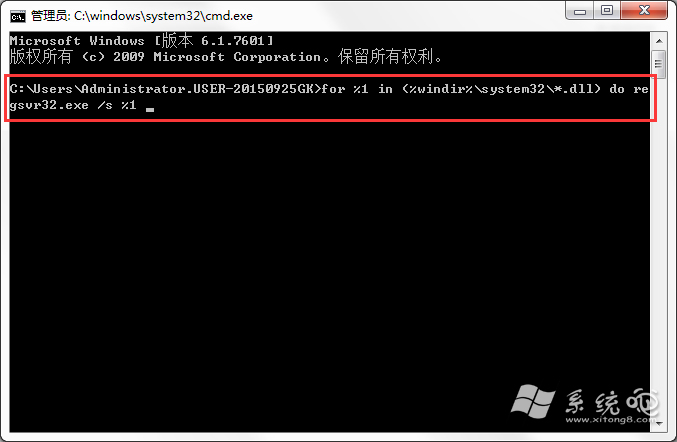
for %1 in (%windir%\system32\*.dll) do regsvr32.exe /s %1

以管理員身分執行 CMD 執行上述指令,等待畫面停止捲動後重開機。
三法任一通常即可解決,建議由簡單至複雜依序嘗試。

Copyright © Windows教程網 All Rights Reserved