Windows XP Windows 7 Windows 2003 Windows Vista Windows 綜合教學 Linux 系統教學
Windows 10 Windows 8 Windows 2008 Windows NT Windows Server 電腦軟體教學

Win7 桌面圖示無法自由移動?關閉「自動排列」「對齊網格」與群組原則「停用拖放」

編輯:Windows 7 系統介紹

Windows 7 桌面圖示拖曳無反應、自動彈回原位,通常是啟用了「自動排列圖示」「對齊至網格」或群組原則「停用拖放」。依序檢查並關閉這三項設定,即可恢復圖示自由拖放排列。

修復步驟

  1. 重新開機:排除暫時性介面卡頓。
  2. 關閉檢視選項:桌面空白處右鍵 →「檢視」→ 取消勾選「自動排列圖示」與「對齊至網格」。
  3. 群組原則解除拖放限制(專業版/旗艦版):
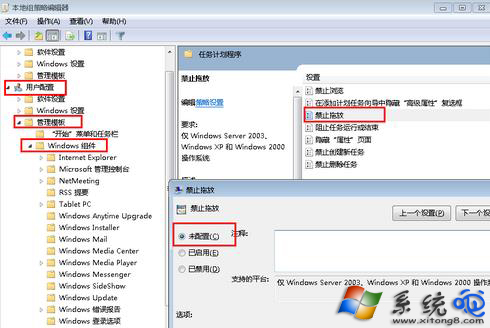
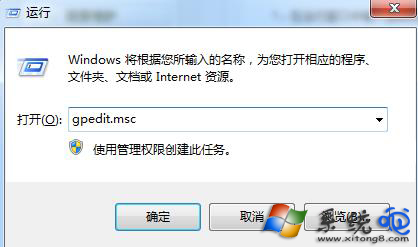
    Win+R → gpedit.msc →「使用者設定」→「管理範本」→「Windows 元件」→「工作排程器」→ 雙擊「停用拖放」 → 設為「未設定」或「已停用」 → 確定。
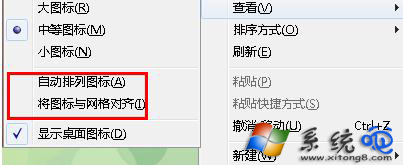
檢視選項-自動排列-對齊網格

gpedit.msc 群組原則

停用拖放設定

家用版替代方案(無 gpedit.msc)

執行 regedit 定位至:
HKEY_CURRENT_USER\Software\Microsoft\Windows\CurrentVersion\Policies\Explorer
找到 NoDragDrop DWORD 值,刪除或設為 0,重開機生效。

補充檢查

  • 桌面圖示過多(>100)可能導致 Explorer 回應延遲,建議整理至資料夾。
  • 第三方桌面管理工具(Fences、Stardock)可能介入圖示行為,嘗試暫停/解除安裝測試。
Copyright © Windows教程網 All Rights Reserved