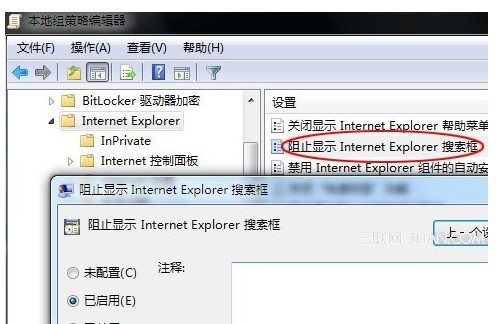
IE9 預設搜尋列使用 Bing,國人習慣用 Google/百度,可透過群組原則隱藏搜尋列:
gpedit.msc
套用後重開 IE,搜尋列消失,工具列更簡潔。若需搜尋,直接在網址列輸入關鍵字或使用偏好搜尋引擎首頁。
Windows 7 忘記登入密碼四種破解方法完整版(含 PE 環境提權)
從啟動管理器看 Windows 7 核心版本:NT 6.1 而非 NT 7,屬 Vista 同代演進
Win7 ReadyBoost 讓 USB 變身系統快取加速電腦
Excel 快速鍵大全:儲存格格式、邊框、字體、列/行操作一覽表
解決 Windows 7 筆電部分線上影片無法播放:停用 GPU 硬體加速
Win7 開機故障四大類圖解:MBR 損壞、0xc000000e、BOOTMGR 遺失/壓縮,附命令修復大全
Windows 7 使用 Defrag 指令整理磁碟碎片完整教學
Windows 7 虛擬機安裝 macOS 系統完整圖文教學