Windows XP Windows 7 Windows 2003 Windows Vista Windows 綜合教學 Linux 系統教學
Windows 10 Windows 8 Windows 2008 Windows NT Windows Server 電腦軟體教學

Win7 工作列異常(移位、鎖定失效)雙重修復:屬性重設位置、CMD 重置 StuckRects2 登錄值並重啟 Explorer

編輯:Windows 7 系統介紹

方法一:圖形介面重設

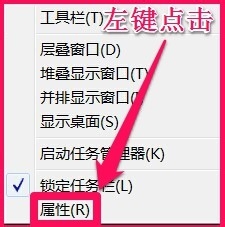
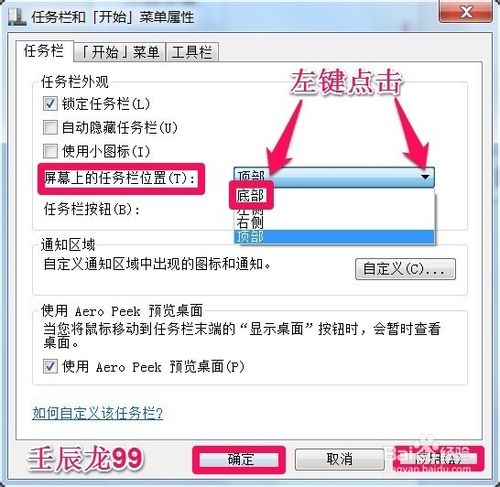
  1. 工作列空白處右鍵 → 「屬性」→ 「工作列在螢幕上的位置」改「底部」→ 套用/確定。
  2. 工作列屬性 設定底部

方法二:命令列徹底重置(頑固異常適用)

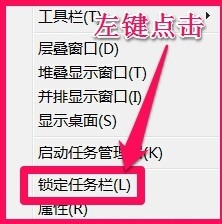
  1. 工作列右鍵 → 取消「鎖定工作列」。
  2. 取消鎖定
  3. Win + R → 貼上並執行:
    cmd /c wmic process where name="explorer.exe" delete & explorer reg delete HKCU\Software\Microsoft\Windows\CurrentVersion\Explorer\StuckRects2 /f & taskkill /f /im explorer.exe & explorer
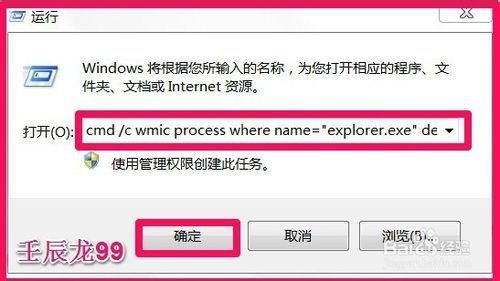
  4. CMD 重置指令
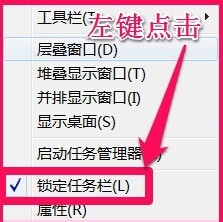
  5. 工作列歸位底部後,重新勾選「鎖定工作列」。
  6. 重新鎖定

指令一次完成:刪除 StuckRects2 損壞的工作列布局快取、強制重啟 Explorer,徹底修復位置、縮圖、啟動按鈕等異常。

Copyright © Windows教程網 All Rights Reserved