Windows XP Windows 7 Windows 2003 Windows Vista Windows 綜合教學 Linux 系統教學
Windows 10 Windows 8 Windows 2008 Windows NT Windows Server 電腦軟體教學

Win7 家用版啟用 Administrator 內建管理員帳號完整圖文教學

編輯:Windows 7 系統介紹

適用情境

Windows 7 家用版缺少「本地用戶和群組」工具,無法透過圖形介面啟用 Administrator,需採用註冊表+安全模式方式。

操作步驟

  1. 按 Win+R 輸入 regedit 開啟登錄編輯器。
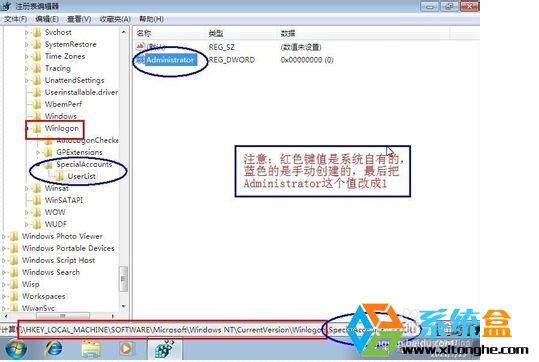
  2. 瀏覽至 HKEY_LOCAL_MACHINE\SOFTWARE\Microsoft\Windows NT\CurrentVersion\Winlogon。
  3. 在 Winlogon 下建立子機碼 SpecialAccounts\UserList。
  4. 在 UserList 中新增 DWORD 值 Administrator,數值設為 1。
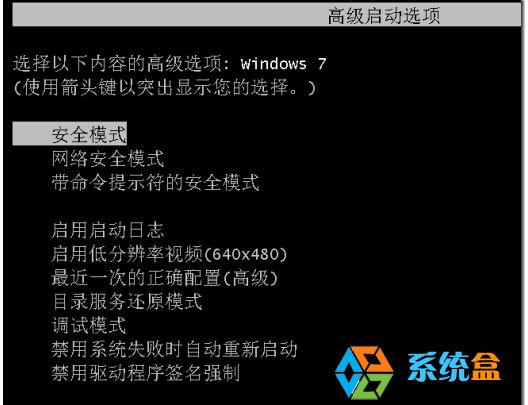
  5. 重開機,開機時連按 F8 進入「安全模式」。
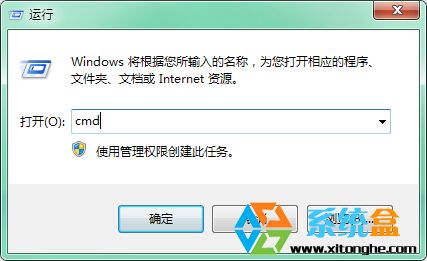
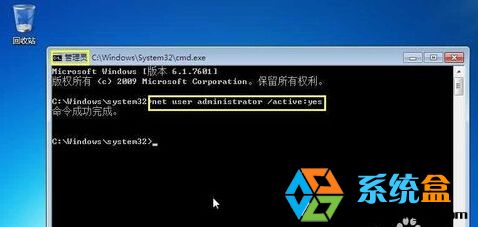
  6. 安全模式下以管理員身分開啟 CMD,執行 net user administrator /active:yes。
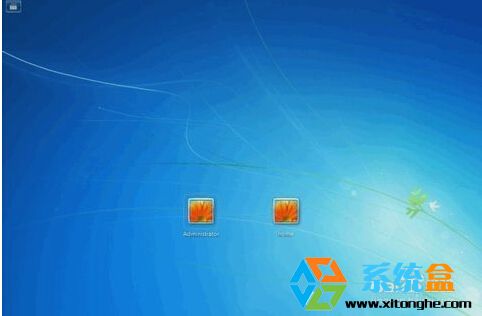
  7. 按 Win+L 切換使用者,即可看到 Administrator 帳號,登入後即擁有完整管理權限。

後續建議

家用版功能受限,若需群組原則、遠端桌面、BitLocker 等進階功能,建議升級至旗艦版或專業版。

Copyright © Windows教程網 All Rights Reserved