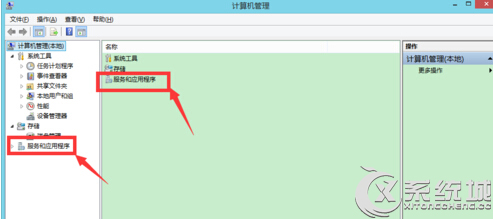
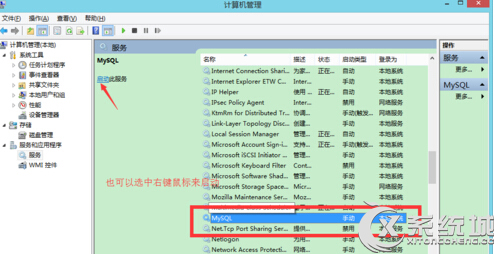
雲端服務通常指本機資料庫服務(如 MySQL),啟動方式如下:
等待服務狀態變為「已啟動」即可使用。若無 MySQL 服務,請確認是否已安裝對應資料庫軟體。
Win7 啟動項找不到 ctfmon.exe?註冊表指令一鍵恢復輸入法支援
Win7 旗艦版設定螢幕自動關閉時間:控制台 → 硬體和音效 → 電源選項 → 選擇關閉螢幕的時間
Win7 移除右下角小白旗 (動作中心) 圖示:通知區域自訂或群組原則兩法任選
Win7 放大鏡完整操作指南:全螢幕/鏡頭/停駐/反色四大模式、快速鍵大全、即時跟隨滑鼠
Windows 7 程式未回應解決方案:修改登錄檔縮短等待時間
Win7 內建 Windows Virtual PC 建立虛擬機安裝 XP 解決相容性問題
Windows 7 任務列時鐘自訂完全指南:顯示星期、12小時制與個性化文字
Win7 開啟 AHCI 藍屏完美解決:註冊表啟用 msahci + 卸載 IDE 控制器 + BIOS 切換三步走