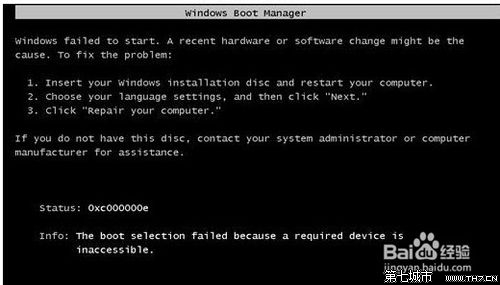
開機出現 File: \windows\system32\Drivers\KAVBootc.sys 錯誤,通常是開機載入器或系統映像損壞。
File: \windows\system32\Drivers\KAVBootc.sys
實測完整格式化硬碟後可正常安裝,隱藏分區常為主因。
Win7 32位純淨版雙擊U盤無法打開的解決方案
Win 7 禁用 DirectDraw 解決螢幕截圖黑屏問題:註冊表與驅動雙管齊下
Windows 7 不支援混合 SLI/CrossFire:需重啟切換體驗差,但強化多獨顯並行與 DX11/WDDM 1.1
Win7 系統垃圾清理全攻略:臨時檔、登錄、快取一網打盡
Win 7行動中心:筆電專屬的亮度、音量、無線、電源一鍵控制面板
Win7 多張圖片輪播桌面背景:自訂切換間隔、隨機順序完整教學
Windows 7 必學 14 個超實用快捷鍵,效率倍增不再是夢
Windows 7 待機/休眠無法喚醒?更新 AHCI 驅動程式即可解決