Windows XP Windows 7 Windows 2003 Windows Vista Windows 綜合教學 Linux 系統教學
Windows 10 Windows 8 Windows 2008 Windows NT Windows Server 電腦軟體教學

Win7 資源管理器加入遠端網路搜尋?安裝搜尋連接器 秒變雲端搜尋神器

編輯:Windows 7 系統介紹

什麼是搜尋連接器?

.osdx (OpenSearch Description) 檔案,讓 Windows 搜尋介面直接對接遠端搜尋引擎 (Bing/Google/Yahoo/自建 Solr/Elasticsearch),輸入關鍵字即時顯示遠端結果。

安裝步驟

  1. 網路上搜尋「Windows Search Connector」/「OpenSearch .osdx」→ 找 Bing/Google/Yahoo/MSN 等現成連接器。
  2. IE 開啟 .osdx 連結 → 自動下載 → 點「新增」安裝。
  3. 搜尋連接器安裝提示
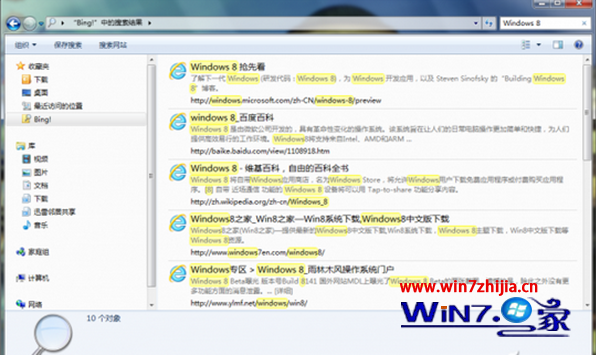
  4. 開啟資源管理器 → 左側「收藏夾」欄出現連接器圖示 → 點選 → 右上角搜尋框輸入關鍵字 → 即時顯示遠端搜尋結果。
  5. 資源管理器遠端搜尋效果

進階:自建搜尋連接器

建立 .osdx XML 檔,指定自家搜尋 API 端點、參數、結果範本,部署到內網 SharePoint/檔案伺服器/Intranet,員工一鍵搜尋企業知識庫/代碼庫/文檔庫。

時代補充

Win7 內建搜尋已停止更新。現代替代:Everything (本地秒搜) + Listary (啟動器) + 瀏覽器書籤關鍵字 / Raycast (Mac) / PowerToys Run (Win10/11)。


Copyright © Windows教程網 All Rights Reserved