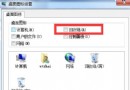
32 位 Win7 理論支援 3.25GB,若僅顯示 2GB,可能是 msconfig 限制了最大記憶體。
msconfig
若為整合顯示卡佔用共享記憶體,屬正常。想完整用滿 4GB 請改裝 64 位 Win7。
Windows 2000 / XP 系統啟動流程深度解析
Win7提示「RPC服務器不可用」無法添加IP/打印/遠程?啟動RPC/DCOM/DHCP三項核心服務即可恢復
Win7 隱藏工作列右側通知區域圖示
IE瀏覽器開啟超慢?關閉「自動偵測設定」秒解決
Win7 啟用與設定語音辨識:從訓練到語音輸入文字完整教學
Win7 遊戲管理器自訂遊戲:修改登錄檔或拖曳捷徑兩種方法
Win7 清除檔案總管搜尋框歷史記錄:群組原則一鍵關閉
XP/Win7 系統內建遊戲路徑速查:XP 在 %SystemRoot%\system32\、Win7 在 %ALLUSERSPROFILE%\Microsoft\Windows\Start Menu\Programs\Games