Windows XP Windows 7 Windows 2003 Windows Vista Windows 綜合教學 Linux 系統教學
Windows 10 Windows 8 Windows 2008 Windows NT Windows Server 電腦軟體教學

Win7 遊戲管理器自訂遊戲:修改登錄檔或拖曳捷徑兩種方法

編輯:Windows 7 系統介紹

Win7 遊戲管理器顯示遊戲資訊源自登錄檔記錄。自訂遊戲可透過 PowerShell 取得 SID/GUID/FileTime 手動寫入登錄檔,或簡單地將遊戲主程式捷徑拖入遊戲管理器。

方法一:登錄檔手動建立 (進階)

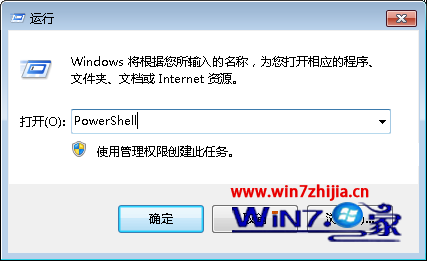
  1. Win+R → PowerShell → 依序執行:
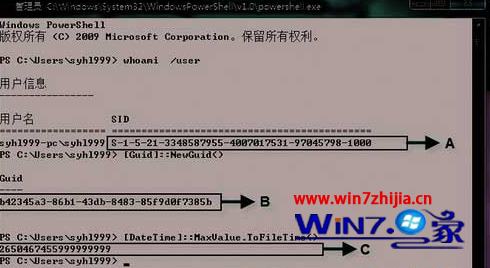
    whoami /user (取得 SID)
    [Guid]::NewGuid() (取得 GUID)
    [DateTime]::MaxValue.ToFileTime() (取得 FileTime)
  2. 將三參數寫入對應登錄檔路徑 (文章未給完整路徑,需自行研究)。

方法二:拖曳捷徑 (最簡單,推薦)

  1. 找到遊戲主程式 (如 D:\Games\FruitNinja\FruitNinja.exe) → 右鍵「傳送到」→「桌面捷徑」。
  2. 開啟「遊戲管理器」→ 將捷徑拖入視窗 → 自動識別並加入。

方法二無需修改登錄檔,即時生效,強烈推薦一般使用者使用。

Copyright © Windows教程網 All Rights Reserved