想換掉 Win7 預設四色旗幟開機動畫?修改登錄檔啟用 OEMBackground,將自訂 JPG 圖片 (建議解析度符合螢幕、檔案 < 256KB) 重命名為 backgroundDefault.jpg 放入指定資料夾,即可擁有專屬開機畫面。
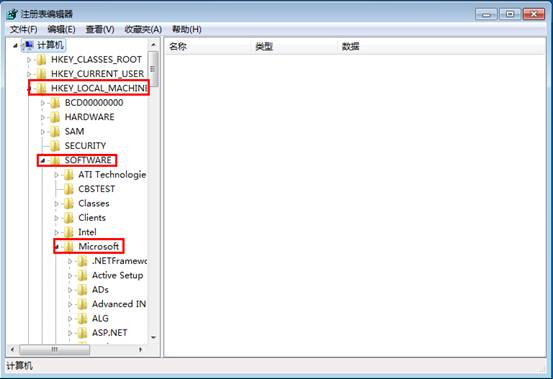
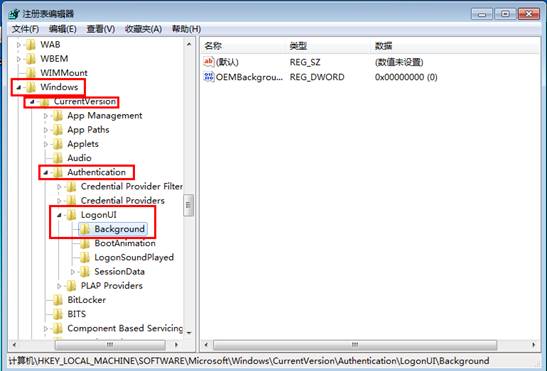
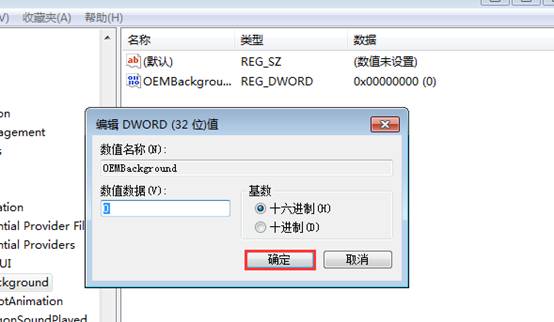
regedit。HKEY_LOCAL_MACHINE\SOFTWARE\Microsoft\Windows\CurrentVersion\Authentication\LogonUI\Background。OEMBackground (若無則右鍵新增 DWORD 值) → 雙擊 → 數值資料改為 1 → 確定。backgroundDefault.jpg。C:\Windows\System32\oobe\info\backgrounds\ (資料夾不存在請自行建立)。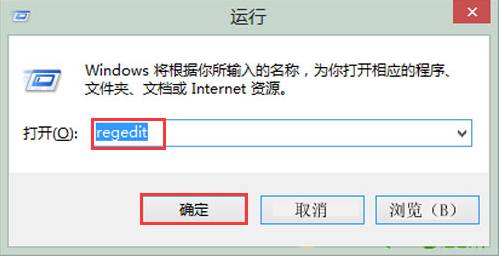
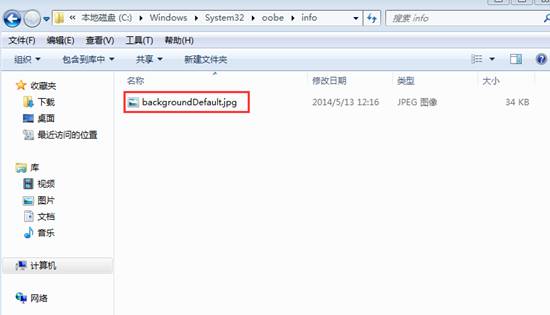
在 backgrounds 資料夾依解析度命名:
background1920x1080.jpg、background1366x768.jpg 等,系統會自動選擇最符合螢幕解析度的圖片。
將 OEMBackground 改為 0 或刪除 backgrounds 資料夾內圖片,重開機恢復四色旗幟動畫。