區域連線顯示「已停用」且無法啟用,常因 Winsock 目錄或 TCP/IP 協議堆疊損壞,透過命令列重設即可修復。
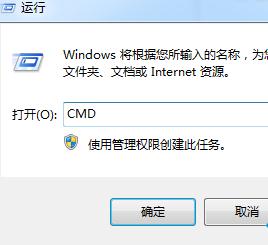
1. 「開始」 → 「執行」輸入 cmd 開啟命令提示字元。
cmd
2. 依序執行以下指令(每行按 Enter):netsh winsock reset catalognetsh int ip reset reset.log
netsh winsock reset catalog
netsh int ip reset reset.log
3. 關閉視窗,重新開機電腦。
重開機後區域連線應恢復正常,可正常啟用/停用。
Windows 7 桌面圖示變白色/空白三大修復法
Win7 更改開機啟動音效 系統聲音設定完整教學
解決 Windows 7 C 槽越變越小:六大清理策略徹底瘦身系統盤
婚禮現場零成本播放婚紗照:Win7內建照片檢視器幻燈片完整攻略
Win7 更換主題時如何保持桌面圖示不變?
Windows 7 設定多個時區時鐘教學:輕鬆掌握全球時間
中文 Win7 開機選單顯示英文?BCD 語言修正指令修復教學
Win7 系統保護、系統映像、排程備份三大差異一次搞懂