Windows XP Windows 7 Windows 2003 Windows Vista Windows 綜合教學 Linux 系統教學
Windows 10 Windows 8 Windows 2008 Windows NT Windows Server 電腦軟體教學

Win7 禁用 Windows Media Center(多媒體娛樂中心)釋放資源

編輯:Windows 7 系統介紹

Windows Media Center 整合 Media Player 與 DVD Maker,若不使用可透過群組原則禁用釋放系統資源。

禁用步驟

1. 按 Win + R 輸入 gpedit.msc 開啟群組原則編輯器。

2. 依序展開:
電腦設定 → 系統管理範本 → Windows 元件 → Windows Media Center
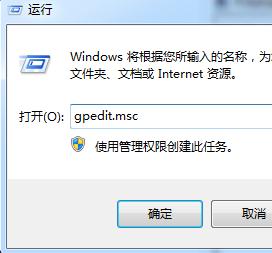
WMC 群組原則路徑

3. 雙擊「不允許執行 Windows Media Center」,選擇「已啟用」,確定儲存。

禁用後 Media Center 相關程式不再載入,可略微提升開機與運作速度。

Copyright © Windows教程網 All Rights Reserved