電腦用久變慢、C 盤紅滿?自製一鍵清理批次檔,雙擊自動清空暫存檔、瀏覽器快取、回收筒、預讀資料,一分鐘釋放數 GB 空間。
cleanup.bat。@echo off
echo 正在清除系統垃圾檔案,請稍等...
del /f /s /q %systemdrive%\*.tmp
del /f /s /q %systemdrive%\*._mp
del /f /s /q %systemdrive%\*.log
del /f /s /q %systemdrive%\*.gid
del /f /s /q %systemdrive%\*.chk
del /f /s /q %systemdrive%\*.old
del /f /s /q %systemdrive%\recycled\*.*
del /f /s /q %windir%\*.bak
del /f /s /q %windir%\prefetch\*.*
rd /s /q %windir%\temp & md %windir%\temp
del /f /q %userprofile%\cookies\*.*
del /f /q %userprofile%\recent\*.*
del /f /s /q "%userprofile%\Local Settings\Temporary Internet Files\*.*"
del /f /s /q "%userprofile%\Local Settings\Temp\*.*"
del /f /s /q "%userprofile%\recent\*.*"
echo 清除完成!
pause
cleanup.bat 即可自動執行。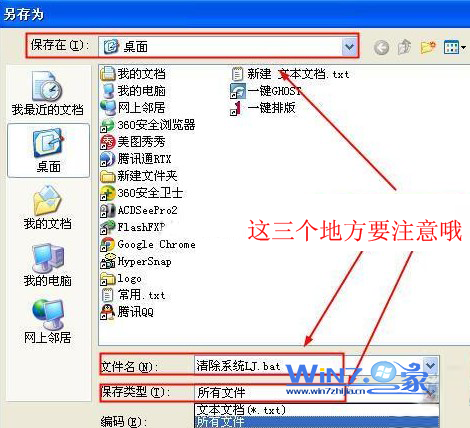
進階:配合工作排程器設定「每日/每週」自動執行,完全免人工;或加入關機指令碼(參考 ID 78954)實現關機自動清理。