Windows XP Windows 7 Windows 2003 Windows Vista Windows 綜合教學 Linux 系統教學
Windows 10 Windows 8 Windows 2008 Windows NT Windows Server 電腦軟體教學

Win7 桌面圖示誤刪恢復:單一捷徑重建 vs 註冊表修復系統圖示

編輯:Windows 7 系統介紹

桌面圖示誤刪分兩種情況,對應不同恢復策略。

情況一:單一應用程式捷徑誤刪

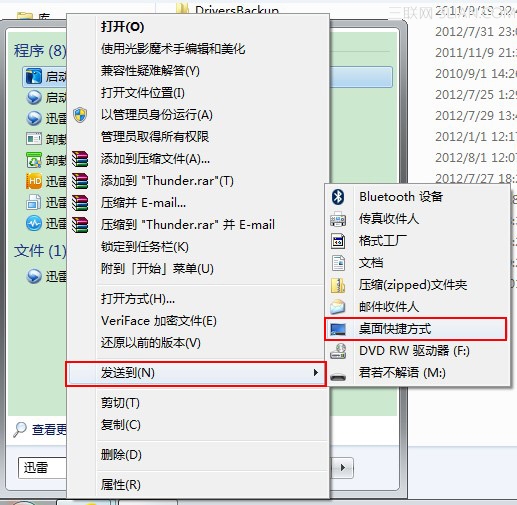
  1. 在「開始選單」/安裝目錄找到原程式 (.exe)。
  2. 右鍵 → 「傳送到」 → 「桌面捷徑」 (或「建立捷徑」後剪貼到桌面)。

傳送到桌面捷徑

情況二:系統圖示 (電腦/回收桶/網路/使用者檔案) 批量消失

  1. 新建文字檔貼上:
    Windows Registry Editor Version 5.00
    [HKEY_LOCAL_MACHINE\SOFTWARE\Microsoft\Windows\CurrentVersion\Explorer\Desktop\NameSpace\{F02C1A0D-BE21-4350-88B0-7367FC96EF3C}]
    @="Computers and Devices"
  2. 另存為 fix_desktop.reg (編碼 ANSI/UTF-8)。
  3. 雙擊執行 → 是 → 確定 → 重新整理桌面 (F5) 即恢復。

原理:該 GUID 對應「電腦」系統圖示命名空間,註冊表遺失導致圖示消失,補回即可。

Copyright © Windows教程網 All Rights Reserved