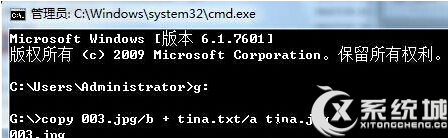
利用 copy /b 指令將文字檔隱藏於圖片檔中,達到簡易加密效果。
copy /b
003.jpg
tina.txt
cmd
copy 003.jpg/b + tina.txt/a tina.jpg
產生的 tina.jpg 外觀為圖片,實含文字內容,雙擊以圖片開啟,需以文字編輯器開啟才能讀取隱藏文字。
tina.jpg
Win7 光碟機消失/設備管理員黃驚嘆號 Code 52 解決:刪除 UpperFilters/LowerFilters 或關閉驅動簽名強制
裝好 Windows 7 只是開始:12 招優化讓系統更順手
Win7 耳機沒聲音?設定預設播放裝置與通訊裝置雙重確認
Win7 圖示快取異常(白紙/黑塊/錯誤圖示)?.bat 一鍵重建 IconCache 與縮圖快取
將 Windows 7 桌面資料夾移至非系統盤釋放 C 盤空間
Win7 明明沒插 USB 隨身碟卻顯示「安全移除硬體」圖示?登錄修改 SATA 控制器屬性隱除可移除裝置圖示
Windows 7 安裝 CAD 出現錯誤 1606 註冊表修復完整解決方案
Win 7 任務列通知區域殘留圖標徹底清理:登錄編輯法刪除無效圖標