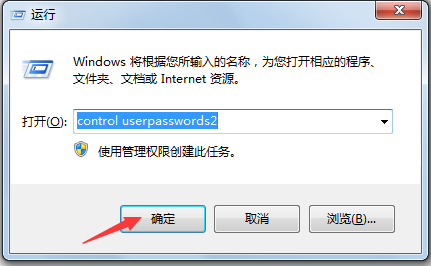
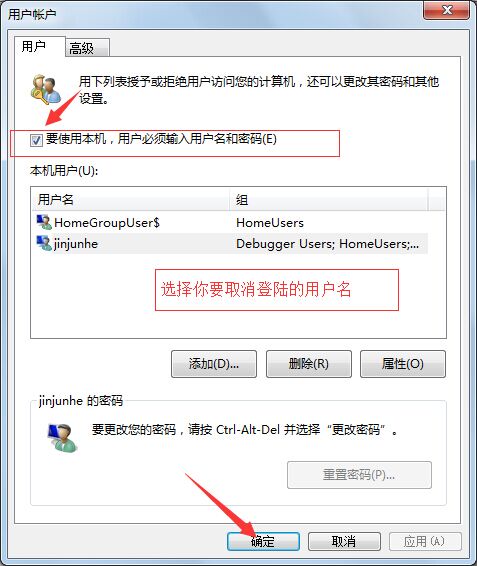
Windows 7 開機預設顯示使用者選擇畫面,即使無密碼也需點擊登入。若為單人使用電腦,可設定自動登入:
control userpasswords2
注意: 多使用者共用電腦建議保留登入畫面,以保護個人隱私檔案。
Win7 前面板耳機沒聲音?兩大核心原因與圖文修復教程
Win7 變更工作組名稱圖解:解決區網共享無法存取
Win7 執行 CMD 提示錯誤 0x10df (4319) 怎麼辦?以系統管理員身分執行即可解決
讓 Windows 7 UAC 安靜工作:群組原則設定「不提示,直接提升」告別頻繁彈窗
Windows 7 磁碟管理自動分區完整教學:壓縮磁碟區、建立新分割區、擴展/調整大小
Windows 7 常見問題巧解決:無法開機、側邊欄天氣、截圖花屏、盤符錯亂、QQ 藍屏、找回「執行」對話框
卸載 Windows 7 SP1 公測版三法:控制台、命令列、系統還原
盜版 Win 7 逼出免費正版升級?品牌廠商審核漏洞讓用戶撿漏