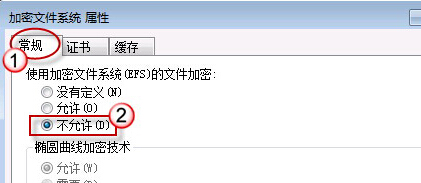
EFS (Encrypting File System) 透過公開金鑰原則加密檔案,若不需使用可透過 secpol.msc 停用,避免誤加密導致資料無法存取。
secpol.msc
之後右鍵檔案屬性將不再出現「加密內容以保護資料」選項。
Win7 虛擬 WiFi 讓筆電秒變無線路由器:netsh 指令建立託管網路、ICS 共享網路、支援 Android 裝置
Win7 取得最高權限 TrustedInstaller 實操:檔案擁有權變更與完全控制授權
Windows 7 移除輸入法前「CH」圖示:重新安裝英文鍵盤再刪除法
Win7 VNC 客戶端連線 Red Hat Linux AS 5.8 完整設定教學
Win7 筆電無線上網設定完整教學:驅動、服務、連線三步驟
Windows 7 解除滑鼠右鍵被鎖定(註冊表修改法)
Windows 7 修補程式安裝後不再頻繁彈出重新開機提示的設定技巧
Win7 旗艦版無法從開始選單拖曳圖示到桌面?個人化設定顯示桌面圖示或搜尋 ICO 修復