Windows XP Windows 7 Windows 2003 Windows Vista Windows 綜合教學 Linux 系統教學
Windows 10 Windows 8 Windows 2008 Windows NT Windows Server 電腦軟體教學

Windows 7 解除滑鼠右鍵被鎖定(註冊表修改法)

編輯:Windows 7 系統介紹

問題成因

惡意軟體或群組原則修改註冊表 NoViewContextMenu 值,導致滑鼠右鍵選單無法彈出。

修復步驟

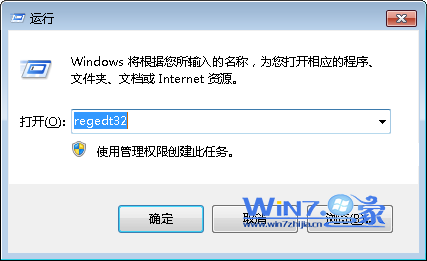
  1. 按 Win+R 輸入 regedt32(或 regedit)開啟登錄編輯器(建議先匯出備份)。
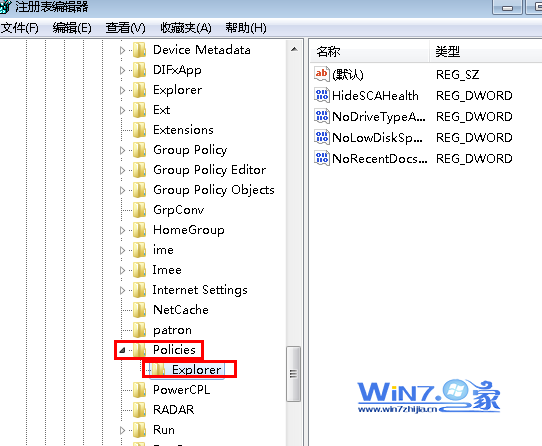
  2. 定位至:HKEY_CURRENT_USER\Software\Microsoft\Windows\CurrentVersion\Policies\Explorer
  3. 在右側窗格找到 NoViewContextMenu(DWORD 值)。
  4. 雙擊修改數值資料為 0(十六進位 00 00 00 00)。
  5. 確定並重新登入或重開機,右鍵選單即恢復正常。
執行 regedt32
註冊表路徑定位

若機碼不存在,表示限制可能在 HKEY_LOCAL_MACHINE 同路徑下,同法修改即可。

Copyright © Windows教程網 All Rights Reserved