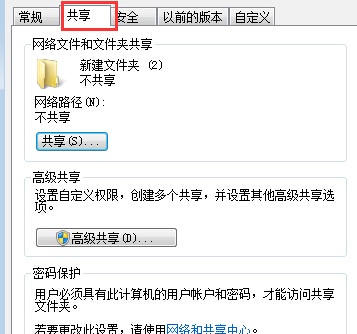
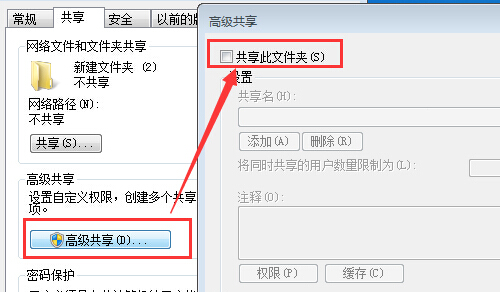
不再需要共用資料夾時,應及時取消共用以免資料外洩。透過資料夾屬性「共用」索引標籤即可關閉。
完成後該資料夾不再出現在網路上,其他電腦無法存取。
Windows 7 常見系統故障綜合解決方案:收藏夾失效、總管不載入、網路印表機、檔案被佔用、光碟機不讀碟
Win7 簡體系統開啟繁體軟體顯示亂碼?安裝繁體語言包並設定非 Unicode 程式語言修復
Win7 英文版系統顯示中文亂碼解決:變更系統地區設定為中文(簡體/繁體)
修改 Windows 資料夾圖示顏色:註冊檔 Shell Icons 替換特定圖示索引、清除快取、重新登入
密碼為何頻頻失竊?揭秘駭客竊密四大手法與防護迷思
iYogi 調查:Win 7 用戶最頭痛「升級/遷移問題」佔 31%
Win7 出現「找不到伺服器或 DNS 錯誤」?完整診斷與修復流程
mscorsvw.exe 佔用 CPU 100%?.NET 執行階段優化服務的正體與關閉方法