Windows XP Windows 7 Windows 2003 Windows Vista Windows 綜合教學 Linux 系統教學
Windows 10 Windows 8 Windows 2008 Windows NT Windows Server 電腦軟體教學

Win7 開機自動彈出 desktop.ini 記事本怎麼辦?

編輯:Windows 7 系統介紹

開機時自動開啟 desktop.ini 記事本,通常是啟動資料夾殘留啟動項所致。以下提供完整解決方案。

解決步驟

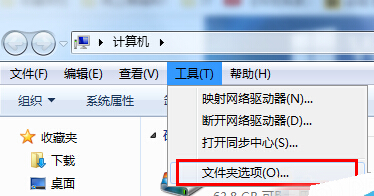
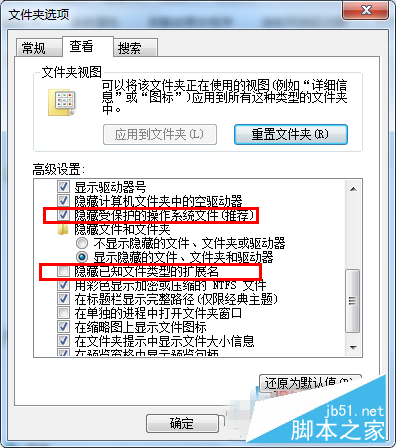
  1. 開啟「資源管理器」→「工具」→「資料夾選項」。
  2. 切換至「檢視」索引標籤,取消勾選「隱藏已知檔案類型的副檔名」與「隱藏受保護的作業系統檔案」,點擊「確定」。
  3. 依路徑檢查啟動資料夾:
    Drive:\Documents and Settings\All Users\Start Menu\Programs\Startup
    Drive:\Documents and Settings\All Users\Start Menu\Programs
    Drive:\Documents and Settings\All Users\Start Menu
  4. 若發現 Desktop.ini 且內容包含 [.ShellClassInfo] LocalizedResourceName=@%SystemRoot%\system32\shell32.dll,-21787,右鍵刪除該檔案。
  5. 重新啟動電腦。

刪除殘留啟動項即可解決開機自動開啟記事本問題。

Copyright © Windows教程網 All Rights Reserved