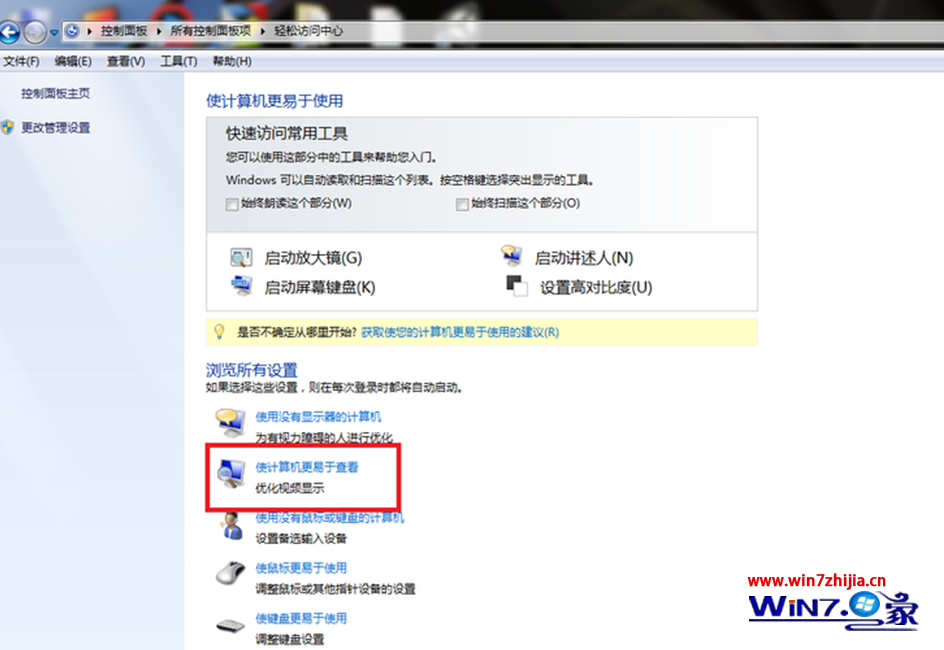
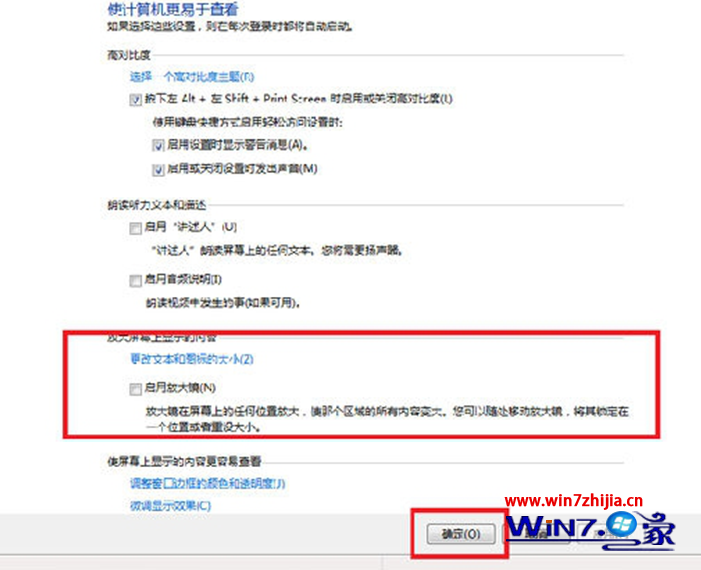
同路徑取消勾選「開啟放大鏡」→ 確定。
視力不佳長者、高解析度螢幕使用者、需頻繁檢視細節圖文者。放大鏡支援全螢幕/鏡頭/固定視窗三種模式,Win++/- 快速縮放。
Win7 系統自我維護三大利器:病毒掃描、效能疑難解答、體驗指數評分
Windows 7 顯示隱藏檔案完整教學:隱藏與取消隱藏雙向操作
瀏覽器廠商聯手施壓歐盟:要求 Windows 7 內置非 IE 選項並突出顯示
Windows 7 桌機無法調整螢幕解析度五大排查方向
Win7 控制台無法開啟?群組原則檢查「禁止存取控制台」設定
Win7 安裝網卡驅動完整教學:裝置管理員更新、驅動人生備份還原、故障排除
Win7 使用 AppLocker 為程式加鎖,提升系統安全性
Win7 設定網路卡連線速度與雙工模式