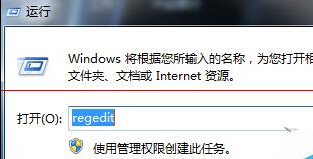
.exe 執行檔關聯損壞導致程式無法執行,可透過註冊表修復預設開啟命令:
regedit
HKEY_CLASSES_ROOT\exefile\shell\open\command
"%1" %*
此鍵值定義 .exe 檔案的預設執行命令,損壞時會導致所有程式無法啟動。
Win7 繁體中文顯示亂碼 兩大解決方案:安裝語言包與地區語言設定
Win7 內建磁碟碎片整理排程自動化設定
Win7 執行 CMD 提示錯誤 0x10df (4319) 怎麼辦?以系統管理員身分執行即可解決
XP 老用戶眼中的 Windows 7 體驗:安裝、介面、內建工具與相容性
Win7 更改開機啟動音效 系統聲音設定完整教學
Win7 列印字體模糊怎麼辦?DPI 調整與 ClearType 微調雙管齊下
Windows 7 官方最低硬體需求完整版:CPU、記憶體、硬碟、顯示卡、特殊功能需求
Win7 開機黑屏怎麼辦?註冊表檢查惡意程式 tlntsvi.exe 解決開機黑屏