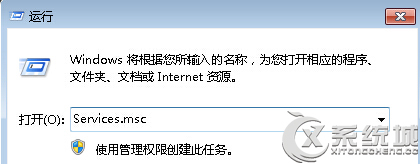
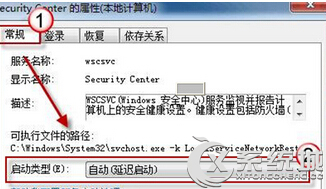
Windows 7 動作中心圖示點擊無反應、無法開啟,通常因 Security Center 服務未啟動:
services.msc
服務啟動後動作中心即可正常開啟。
Win7 查看已儲存 Wi-Fi 密碼完整教學
Win7 產生電腦健康報告指令:perfmon /report 自動收集硬體、軟體、效能、網路、磁碟、記憶體完整資訊
Windows 7 找回右鍵選單遺失的「個人化」與「小工具」選項
Win7 32 位純淨版修改 Wi-Fi 密碼後無法上網?更新儲存的憑證即可解決
Win7 關閉使用者帳戶控制 (UAC) 提示:調整通知等級至「從不通知」
Win7 Word 文件將空白鍵顯示為圓點符號?啟用「顯示/隱藏編輯標記」與格式標記設定
Win7 禁止遠端存取登錄表路徑 防止駭客透過遠端登錄操作竊改系統設定
解決 Win7 安裝提示「無法安裝到這個磁碟」:MBR/GPT 分區表衝突完整指南