桌面右鍵選單中「個人化」與「小工具」選項消失,通常因註冊表項目遺損或第三方優化軟體誤刪導致。
Windows Registry Editor Version 5.00

[HKEY_CLASSES_ROOT\DesktopBackground\Shell]

[HKEY_CLASSES_ROOT\DesktopBackground\Shell\DesktopIcons]
@="@%SystemRoot%\\System32\\desk.cpl,-112"
"Position"="Bottom"
"Icon"=hex(2):25,00,73,00,79,00,73,00,74,00,65,00,6d,00,72,00,6f,00,6f,00,74,00,25,00,5c,00,73,00,79,00,73,00,74,00,65,00,6d,00,33,00,32,00,5c,00,74,00,68,00,65,00,6d,00,65,00,63,00,70,00,6c,00,2e,00,64,00,6c,00,6c,00,2c,00,2d,00,31,00,00,00

[HKEY_CLASSES_ROOT\DesktopBackground\Shell\DesktopIcons\command]
@=hex(2):22,00,25,00,53,00,79,00,73,00,74,00,65,00,6d,00,52,00,6f,00,6f,00,74,00,25,00,5c,00,73,00,79,00,73,00,74,00,65,00,6d,00,33,00,32,00,5c,00,72,00,75,00,6e,00,64,00,6c,00,32,00,2e,00,65,00,78,00,22,00,20,00,73,00,68,00,65,00,6c,00,6c,00,33,00,32,00,2e,00,64,00,6c,00,6c,00,2c,00,43,00,6f,00,6e,00,74,00,72,00,6f,00,6c,00,5f,00,52,00,75,00,6e,00,44,00,4c,00,4c,00,20,00,64,00,65,00,73,00,6b,00,2e,00,63,00,70,00,6c,00,2c,00,2c,00,30,00,00,00

[HKEY_CLASSES_ROOT\DesktopBackground\Shell\Display Properties]
@=hex(2):40,00,25,00,53,00,79,00,73,00,74,00,65,00,6d,00,52,00,6f,00,6f,00,74,00,25,00,5c,00,53,00,79,00,73,00,74,00,65,00,6d,00,33,00,32,00,5c,00,64,00,69,00,73,00,70,00,6c,00,61,00,79,00,2e,00,64,00,6c,00,6c,00,2c,00,2d,00,39,00,00,00
"Icon"=hex(2):25,00,53,00,79,00,73,00,74,00,65,00,6d,00,52,00,6f,00,6f,00,74,00,25,00,5c,00,53,00,79,00,73,00,74,00,65,00,6d,00,33,00,32,00,5c,00,64,00,69,00,73,00,70,00,6c,00,61,00,79,00,2e,00,64,00,6c,00,6c,00,2c,00,2d,00,31,00,00,00
"Position"="Bottom"
"ControlPanelName"="Microsoft.Display"

[HKEY_CLASSES_ROOT\DesktopBackground\Shell\Display Properties\command]
"DelegateExecute"="{06622D85-6856-4460-8DE1-A81921B41C4B}"
FixDesktopContextMenu.reg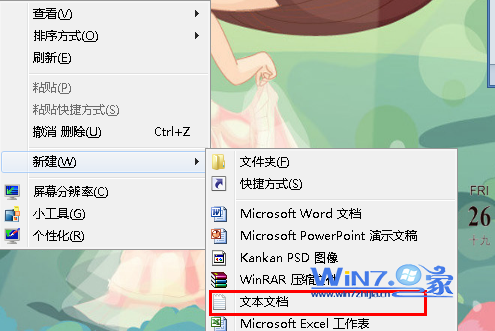
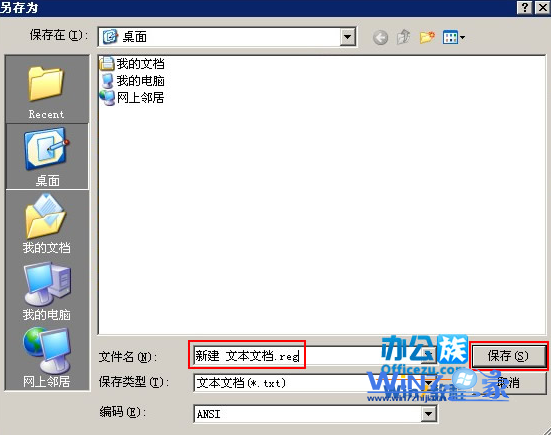
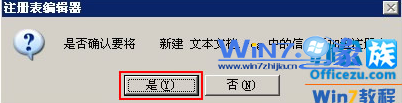
| 鍵值路徑 | 功能 | 對應選單項目 |
|---|---|---|
DesktopBackground\Shell\DesktopIcons | 桌面圖示設定 | 個人化 → 變更桌面圖示 |
DesktopBackground\Shell\Display Properties | 顯示屬性/個人化 | 個人化 |
control desk.cpl,,@themes 或桌面空白處右鍵若有「個人化」直接點擊control desk.cpl,,@gadgetsrundll32.exe shell32.dll,Control_RunDLL desk.cpl,,0HKEY_CLASSES_ROOT\DesktopBackground\Shell 分支