Windows XP Windows 7 Windows 2003 Windows Vista Windows 綜合教學 Linux 系統教學
Windows 10 Windows 8 Windows 2008 Windows NT Windows Server 電腦軟體教學

Win7 群組原則隱藏「登出」選單:防止誤操作、簡化關機選單

編輯:Windows 7 系統介紹

共用電腦、資訊教室、Kiosk 模式下想移除「開始選單」的「登出」按鈕?本機群組原則一鍵搞定,無需第三方工具。

  1. Win+R → gpedit.msc。
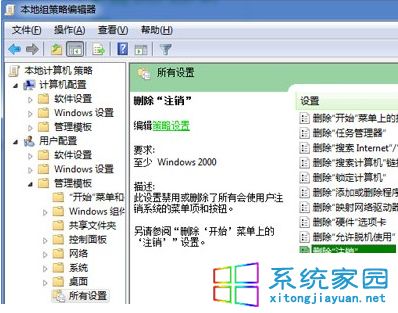
  2. 依序展開:「使用者設定」→「系統管理範本」→「所有設定」。
  3. 右側找到「移除登出」→ 雙擊 →「已啟用」→ 確定。
  4. 執行 gpupdate /force 或重新登入生效,「登出」按鈕消失。
群組原則移除登出

還原:同路徑將「移除登出」改為「未設定」並 gpupdate 即可恢復。注意:家用版無 gpedit.msc,可改註冊表 HKEY_CURRENT_USER\Software\Microsoft\Windows\CurrentVersion\Policies\Explorer 新增 DWORD NoLogOff=1。

Copyright © Windows教程網 All Rights Reserved