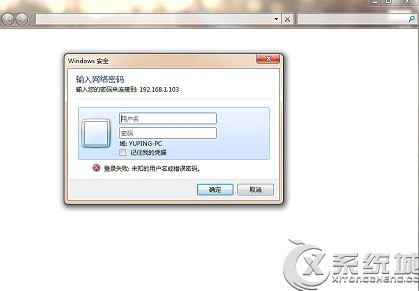
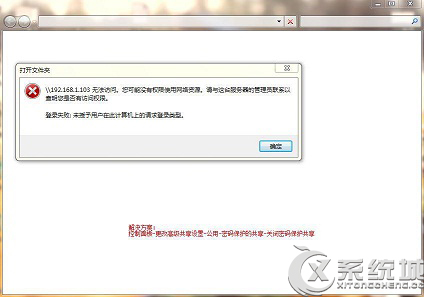
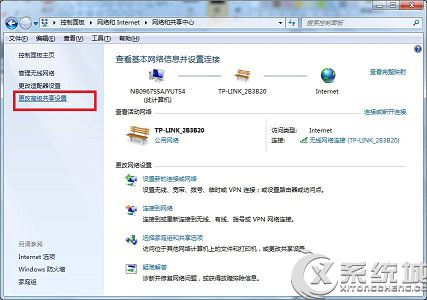
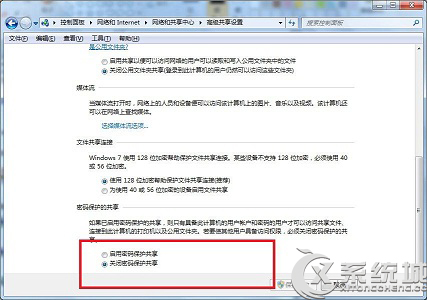
區域網路透過 IP 存取 Windows 7 共用資料夾提示要求輸入使用者名稱密碼,即使已啟用 Guest 帳戶。解決方法:確認並關閉「密碼保護共享」。
前提條件:已啟用 Guest 帳戶且無密碼,共用資料夾權限已加入 Everyone/Guest 讀取權限。
Windows 7 任務列快速啟動修改為「電腦」而非「資料庫」教學
認識 Windows 7 系統映像備份與還原:替代 Ghost 與還原精靈
Win7 Windows Update 出現 0x8024402F 錯誤?修改 DNS 兩步驟快速解決
Win7 如何偽裝 IP 位址?設定靜態內網 IP 隱藏真實位址(僅限區域網路)
修正 Windows 7 下 Notepad++「尋找取代」對話框無法關閉 Bug:關閉透明效果
IE 8 實用技巧大公開:找回快速啟動按鈕、啟用斷點續傳下載
Win7 80 連接埠被 System 佔用?登錄修改 HTTP 服務釋放連接埠
Win7 預設關閉 Telnet 功能啟用教學:透過「開啟或關閉 Windows 功能」安裝用戶端與伺服器