安裝 Office 後系統變慢,主因是 Find Fast 索引服務頻繁掃描。登錄表調整索引頻率:
Find Fast
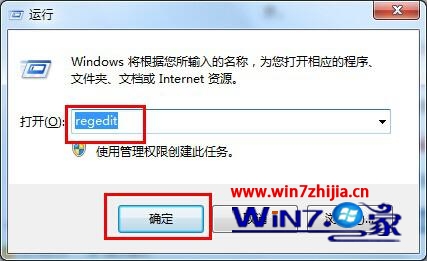
regedit
HKEY_LOCAL_MACHINE\Software\Microsoft\Office\9.0\Find Fast
SlowDown
2000
降低索引頻率即可釋放系統資源,Office 功能不受影響。
Win7 螢幕亮度快速調節:控制台電源選項或 Win+X 選單
善用 Win7 資源監視器查看 QQ 好友 IP 位址,無需第三方軟體
無光碟安裝 Windows 7 兩大法:基礎部署與創意啟動修復法
Win7 拒絕連線無線路由器?更新韌體解決相容性問題
Win7 內建 IE8 新功能體驗:加速器、網頁切片、標籤分組、自動修復
Windows 7 內建計算機隱藏功能大公開:日期計算、單位換算、試算表模式
Win7 桌面匯率換算小工具:新增、設定與多幣別顯示
Win7網際網路連線共享(ICS)完整架設:有線/無線雙網卡閘道器設定教學