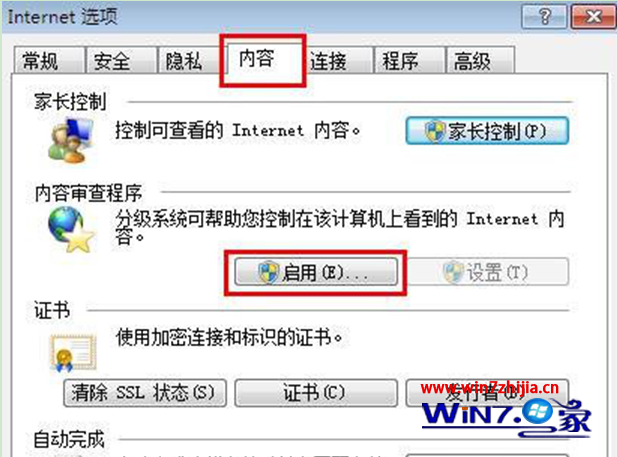
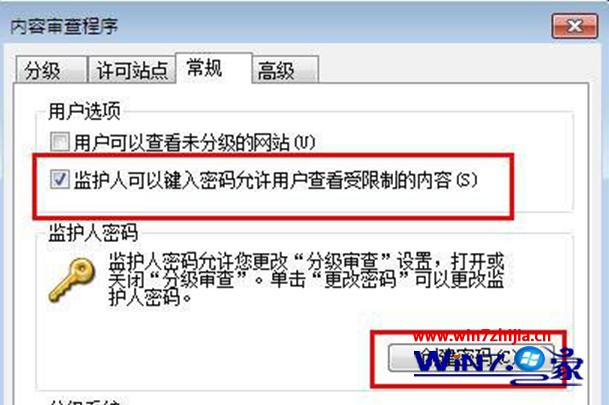
為 IE 瀏覽器設定密碼,防止他人隨意瀏覽:
設定後需輸入密碼才能變更內容分級設定,保護瀏覽環境安全。
Win7 藍屏顯示 Memtest86+ V2.11 怎麼辦?記憶體診斷與修復完整指南
輕鬆安裝 Win7 主題,打造專屬個性桌面
Win7 64 位旗艦版查看系統詳細資訊三大法:slmgr.vbs、dxdiag、systeminfo 指令對比
Windows 7 開關機加速雙招:修啟動等待、調關機逾時
Windows 7 反擊 Mac:修正 Vista 缺失、上網本優化、XP Mode 兼容舊應用
解決 Win7 安裝軟體出現 Error 1935:修改登錄 + SFC 掃描
硬碟故障搶救十大絕招:從 BIOS 辨識、分區表、FAT、目錄表到誤刪分區/格式化資料恢復
Win7/8.1 開機「正在啟動 Windows」時間過久?BIOS 關閉 CSM 支援加速