安裝破解主題後擔心被惡意軟體竄改?啟用群組原則鎖定主題設定。
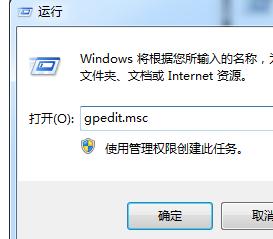
gpedit.msc
設定完成後,主題設定將被鎖定,任何程式嘗試變更主題都會失效,保護個人化桌面安全。
Windows 7 三步驟快速查看無線網路密碼:無需第三方軟體即時顯示明文
Win7 筆電任務列電源/電池圖示消失?透過群組原則恢復顯示
Win7 清理通知區域殘留圖示:註冊表刪除 IconStreams 與 PastIconsStream 徹底淨化
Windows 7 手動優化:虛擬記憶體、休眠、系統還原三大項調整
Win7 桌面匯率換算小工具:新增、設定與多幣別顯示
Win7 關閉自動休眠/睡眠圖文教程:電源選項四步設為「從不」
修復 Windows 7 登錄損壞:使用系統備份 RegBack 替換法
Windows 7 檔案共享完整設定指南:解決XP訪問無權限問題