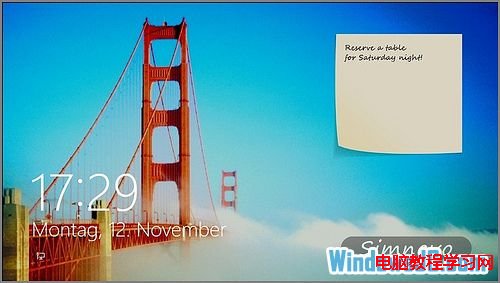
Windows 8 鎖定畫面預設僅顯示日期時間、網路狀態與應用程式通知。若有行程安排或備忘事項,必須解鎖進入系統才能查看。透過應用程式 TuneUp IncrediLock,可在鎖定畫面直接新增便利貼,方便快速查看備忘事項。
除了提供鎖定畫面便利貼功能,TuneUp IncrediLock 還提供鎖定畫面壁紙,可依分類選擇不同風格壁紙。
可在 Windows 應用程式商店搜尋下載。
Win7 C 槽 System Volume Information 資料夾刪除教學:病毒藏匿熱點清理
重裝 Win7 後開機提示 Invalid partition table:DiskGenius 重建 MBR 分區表修復
Win7 任務列視窗不合併:設定「永不合併」顯示完整標題
Win7 跳出 ActionScript 錯誤?更新 Flash Player 修復腳本異常
Windows 7 媒體中心看網路影片常見問題解答:版本限制、升級、更新、廣告、畫質、殺毒軟體干擾全覆蓋
Windows 7 安裝 Virtual PC 與 XP Mode 完整圖文教學
Win7 調整螢幕亮度:控制台電源選項與 Win+X 行動中心雙管道
Win7 圖片縮圖不顯示?一鍵開啟預覽圖功能