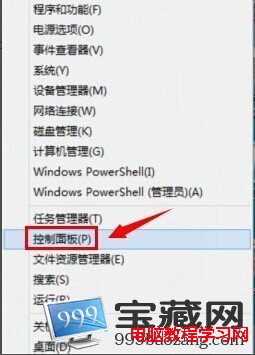
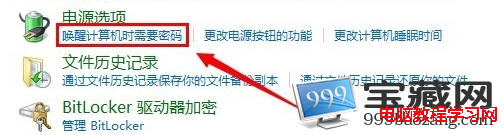
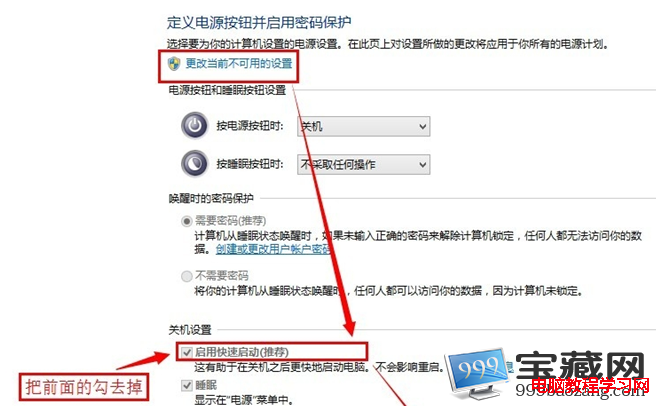
部分 Windows 8 使用者遇到關機後電腦自動重新開機的情況,可能誤以為是主機板故障。實際上這與 Windows 8 的「快速啟動」功能有關。本文提供解決方案。
以上即為解決 Windows 8 關機後自動開機的方法,希望能幫助遇到此問題的使用者。需下載 Windows 8 系統的用戶可參考相關安裝版下載資源。
Win7 機箱前置耳機插孔沒聲音?Realtek 設定一鍵修復
Win7 IE瀏覽器提示「已完成,但網頁上有錯誤」?重註冊jscript/vbscript DLL+清理緩存+關閉腳本錯誤提示三步修復
電腦定時開機怎麼設定?Windows 7 BIOS 設定完整教學
Win7 如何隱藏桌面所有圖示?一鍵切換顯示/隱藏教學
Windows 7 的七大痛點:光環背後的不完美之處
解決 Windows 7 下迅雷看看高清無法播放:IE8 設定調整
微軟推 Windows 7 升級金鑰產品包:滿足用戶升級高階版本需求
Windows 7 十大實用快速鍵,告別滑鼠操作