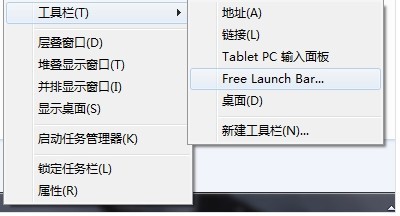
從 XP 升級 Win7 後,習慣使用 FreeLaunchBar 快速啟動工具的使用者常發現安裝完成卻不見蹤影。實際上 FreeLaunchBar 在 Win7 以「工具列」形式整合在工作列,啟用方式如下:
後續操作(新增/移除圖示、資料夾、分隔線)與 XP 時期相同。若工具列被鎖定,請先右鍵工作列取消「鎖定工作列」再調整。
Win7 反蹭網終極技巧:將無線網路名稱(SSID)設為中文,讓駭客掃描工具失效
Win7 桌面加入炫酷時鐘小工具:自訂樣式與秒針顯示
Win 7 虛擬 WiFi (託管網路) 完整教學:筆電秒變無線路由器,共享有線/無線網路
Win7 網路位置被鎖定為「公用」無法變更?兩種官方解鎖方案
Windows 7 內建防火牆開啟與關閉完整圖文教學
Win7訪問局域網共享提示「無權訪問」?組策略刪除「拒絕從網絡訪問」Guest賬號
Win7 批次重命名檔案:秒懂技巧與進階應用
Windows 7 企業版核心安全與效能新功能深度解析