Windows 7 中磁碟機圖示(如 D 槽、E 槽)突然變成通用磁碟圖示、空白、或顯示錯誤圖示,通常非病毒感染,而是圖示快取資料庫損毀或磁碟代號對應關係暫時混亂。最簡單有效的修復法:在「磁碟管理」中暫時變更磁碟代號,再改回原代號,強制系統重建圖示關聯。
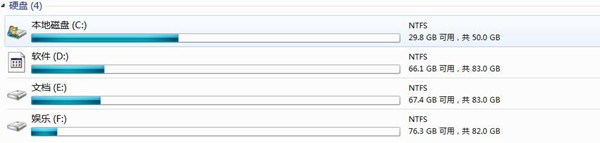
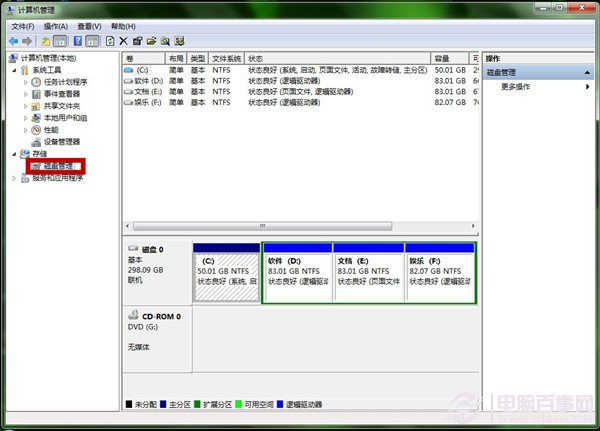
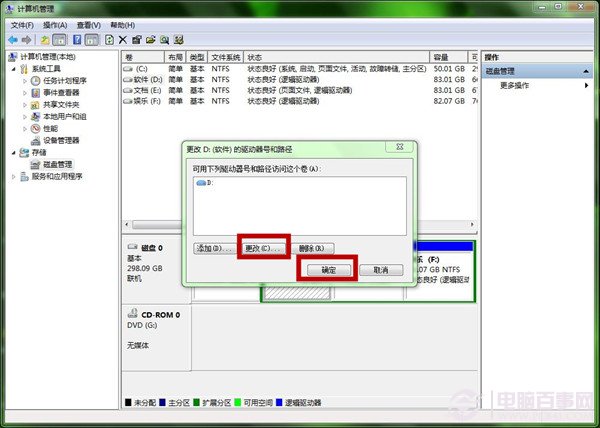
此操作強制系統更新掛載點管理器與 Shell 命名空間的圖示關聯,同時觸發圖示快取重建,通常即時生效,無需重開機。
若上述法無效,執行批次檔清除快取資料庫:
@echo off
taskkill /f /im explorer.exe
attrib -h -s -r "%localappdata%\IconCache.db"
del /f "%localappdata%\IconCache.db"
for /d %%d in ("%localappdata%\Microsoft\Windows\Explorer\*") do (
    attrib -h -s -r "%%d"
    del /f "%%d\thumbcache_*.db"
)
reg delete "HKCU\Software\Classes\Local Settings\Software\Microsoft\Windows\CurrentVersion\TrayNotify" /v IconStreams /f
reg delete "HKCU\Software\Classes\Local Settings\Software\Microsoft\Windows\CurrentVersion\TrayNotify" /v PastIconsStream /f
start explorer.exe
儲存為 RebuildIconCache.bat,以系統管理員身分執行。
執行以下註冊表清理:
Windows Registry Editor Version 5.00

[-HKEY_CURRENT_USER\Software\Microsoft\Windows\CurrentVersion\Explorer\Shell Icons]
[-HKEY_LOCAL_MACHINE\SOFTWARE\Microsoft\Windows\CurrentVersion\Explorer\Shell Icons]
儲存為 FixBlackIcon.reg 匯入,或建立批次檔:
@echo off
reg delete "HKCU\Software\Microsoft\Windows\CurrentVersion\Explorer\Shell Icons" /f
reg delete "HKLM\SOFTWARE\Microsoft\Windows\CurrentVersion\Explorer\Shell Icons" /f
taskkill /f /im explorer.exe & start explorer.exe| 快取類型 | 路徑 |
|---|---|
| 主要圖示快取 | %LocalAppData%\IconCache.db |
| 縮圖快取 | %LocalAppData%\Microsoft\Windows\Explorer\thumbcache_*.db |
| 系統托盤圖示記憶 | HKCU\Software\Classes\Local Settings\Software\Microsoft\Windows\CurrentVersion\TrayNotify (IconStreams, PastIconsStream) |
cleanmgr 或 CCleaner),防止快取資料庫過大損毀。