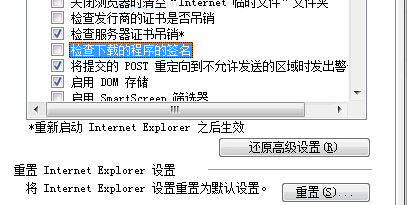
IE 下載卡在 99% 常因「檢查下載程式簽章」導致驗證卡住,或暫存資料夾滿載。提供兩種解決方案。
若上述無效,清空 IE 暫存網頁檔案資料夾(或刪除部分無用檔案)釋放空間,通常即可恢復下載。
Win7 當無線路由器設定:虛擬 WiFi 熱點與 ICS 共用網路完整教學
Windows 7 內建 NFS 用戶端完整設定教學:掛載 Linux/UNIX 共享資料夾
Windows 7 筆記本三步變身 Wi-Fi 熱點:指令法建立虛擬無線網路
Win7 禁止 Windows Media Player 自動更新的群組原則設定
Win7 內建燒錄功能:資料光碟/音樂 CD 免安裝第三方軟體直接燒錄
Windows 7 系統還原與系統映像備份完整教學:內建功能媲美 Ghost
微軟變革 Windows 7 研發流程:客戶主導、兼容優先
Win7 縮短關機等待時間:修改登錄 WaitToKillServiceTimeout