命令提示字元執行 arp -s 閘道IP 閘道MAC 提示「ARP 項目新增失敗」,無法建立靜態 ARP 綁定防止 ARP 欺騙。
Win7/Vista 以降,arp -s 僅能建立動態 ARP 項目,重開機即失效;且若介面索引 (Idx) 未指定,系統無法判斷綁定至哪張網卡。必須使用 netsh 指令配合介面索引建立持久鄰居項目。
netsh interface ipv4 show interfacesnetsh interface ipv4 add neighbors 11 "閘道IP" "閘道MAC"netsh interface ipv4 add neighbors 11 "192.168.1.1" "00-11-22-33-44-55"arp -a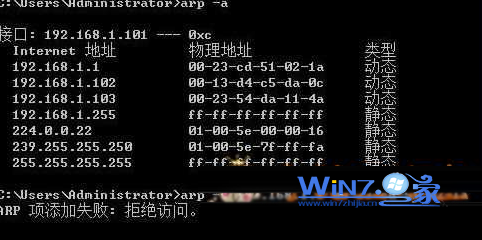
arp -d 無法刪除 netsh 建立的靜態項目,必須使用:
netsh interface ipv4 delete neighbors 11 "閘道IP"
| 步驟 | 指令 | 說明 |
|---|---|---|
| 1. 查閘道 MAC | arp -a | 記下閘道 IP 對應的物理位址 |
| 2. 查介面 Idx | netsh interface ipv4 show interfaces | 記下目標網卡 Idx (如 11) |
| 3. 綁定靜態 ARP | netsh interface ipv4 add neighbors Idx "閘道IP" "閘道MAC" | 建立持久鄰居項目 |
| 4. 驗證 | arp -a | 確認顯示 static |
| 5. 刪除綁定 | netsh interface ipv4 delete neighbors Idx "閘道IP" | 移除靜態項目 |
ipv4 改為 ipv6,指令結構相同。