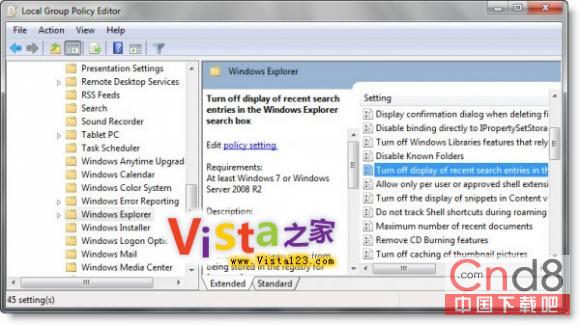
Windows 7 搜尋框輸入時會顯示歷史搜尋建議,若不想保留紀錄可透過群組原則關閉:
gpedit.msc
設定後搜尋框不再顯示歷史輸入建議,保護隱私。
Windows 7「上帝模式」啟用指南:一鍵掌控所有系統設定
Windows 7 重裝後必做的 5 項初始設定
硬碟安裝 Win7 PE 開機選單:建立 Recovery 目錄與 Reagentc 指令
Win7 旗艦版無法使用網銀 三大解決方向:憑證、補丁、安全等級
Windows 7 硬碟分割區圖示異常/損毀?重新指派磁碟機代號快速修復
Win7如何設置TP-Link路由器密碼?瀏覽器訪問tplogin.cn/192.168.1.1→無線設置修改WiFi密碼+系統工具修改登錄密碼
Win7 內建驅動安裝 HP 5200LX 印表機完整圖文教學
Win7 Windows Easy Transfer:重灌前備份設定與資料,重灌後一鍵還原