Windows XP Windows 7 Windows 2003 Windows Vista Windows 綜合教學 Linux 系統教學
Windows 10 Windows 8 Windows 2008 Windows NT Windows Server 電腦軟體教學

Win7 開機無輸入法工具列?msconfig 啟用 ctfmon / 註冊表加入啟動項恢復語言列

編輯:Windows 7 系統介紹

Windows 7 開機後工作列缺少輸入法指示器 (語言列),無法切換中英輸入。通常是 ctfmon.exe (文字服務架構) 未隨開機啟動。兩種方法恢復。

方法一:msconfig 啟用 ctfmon(圖形介面、簡單)

  1. Win+R → msconfig → 「啟動」索引標籤。
  2. 找到 ctfmon → 勾選 → 套用 → 確定 → 重新啟動。

msconfig-啟動-ctfmon

方法二:註冊表手動加入啟動項(徹底、適用 msconfig 找不到 ctfmon)

  1. Win+R → regedit。
  2. 定位:HKEY_LOCAL_MACHINE\SOFTWARE\Microsoft\Windows\CurrentVersion\Run。
  3. 右鍵空白處 → 新增 → 字串值 → 名稱:ctfmon。
  4. 雙擊修改數值資料:C:\Windows\System32\ctfmon.exe (確認路徑存在)。
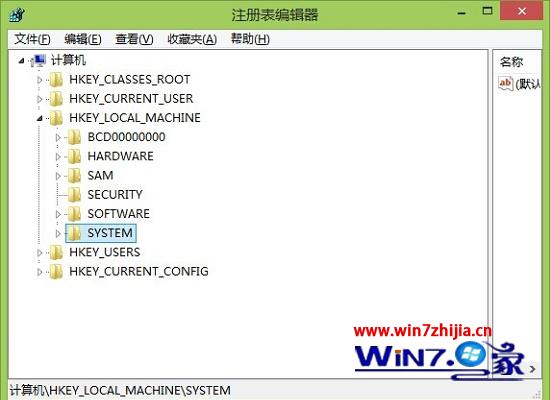
  5. 確定 → 關閉註冊表 → 重開機。

註冊表Run-新增ctfmon

臨時恢復指令(不重開機)

Win+R → ctfmon → Enter,語言列即時出現。適合臨時需求。

進階檢查

  • 服務:services.msc → 「Touch Keyboard and Handwriting Panel Service」/「TabletInputService」→ 啟動類型「手動/自動」。

  • 控制台 → 「地區和語言」→ 「鍵盤和語言」→ 「變更鍵盤」→ 「語言列」索引標籤 → 選擇「停駐在工作列上」。
Copyright © Windows教程網 All Rights Reserved