任務管理員中發現 mrt.exe 佔用大量記憶體,許多使用者誤以為是病毒。實際上 mrt.exe(Malicious Software Removal Tool)是微軟官方「惡意軟體移除工具」的執行檔,位於 C:\Windows\System32\mrt.exe,屬正常系統進程,安全等級 0(最安全)。它會在 Windows Update 後自動執行掃描,佔用資源屬正常現象。
C:\Windows\System32\mrt.exe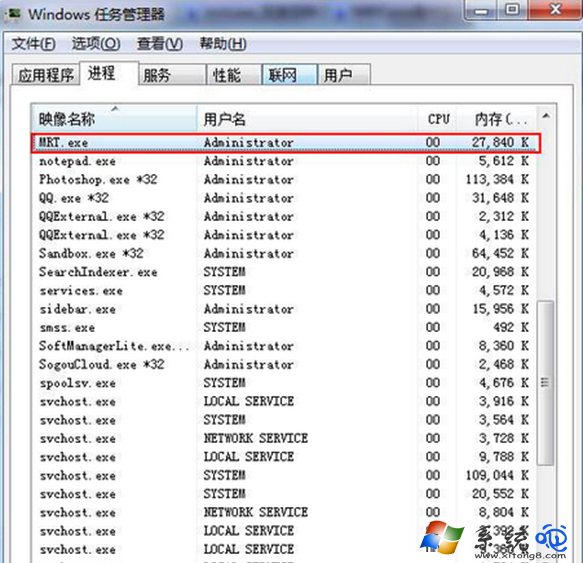
mrt.exe 若無法啟動,表示系統檔案遺失,可執行 sfc /scannow 修復,或從微軟官網下載最新獨立版 MSRT 手動掃描。惡意軟體常偽裝同名檔案放置於非系統目錄(如 C:\ProgramData\mrt.exe、C:\Temp\mrt.exe),若發現異常路徑的 mrt.exe 請立即全盤掃毒。
Windows 7 顯示桌面有四種方法:Win+D、工作列右側長條、Win+空格預覽、右鍵選單
Win7 更新失敗 800f081f?DISM 指令修復元件存放區恢復更新
自訂 Windows 7 系統聲音:控制台硬體與音效更換開機/關機/提示音,天天好心情
Windows 7 音量混合器:單獨控制每個程式音量、靜音網頁背景音樂
Mac 電腦安裝 Windows 7 驅動程式完整指南:Boot Camp 輕鬆搞定
Win7 內建字符編輯程式 (EUDCEDIT) 製作專屬特殊字符:編碼選擇、參照現有字形、矩形框選、儲存私有區