顯示屬性中「疑難排解」頁籤的硬體加速滑桿無法調整,或遊戲/影片播放異常,提示硬體加速不可用。
deskadp.dll、deskmon.dll、deskperf.dll 三個檔案。C:\Windows\System32 找到同名檔案,右鍵→內容→安全性→取得完全控制權限。C:\Windows\System32,選擇「取代目的地檔案」。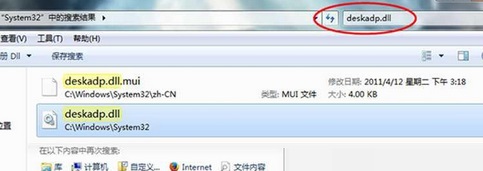
完成後重新開機,硬體加速功能應恢復正常。建議優先嘗試更新顯卡驅動程式,僅在驅動無解時使用此法。
在 Windows 7 體驗 Windows 8 開機動畫:Beta 魚與氣泡進度圈
Windows 7 找不到快速啟動列?其實已合併到工作列,拖曳捷徑到開始按鈕旁即可實現
Win7 執行軟體提示「無法定位動態連結庫 user32.dll 上的 dwmhintdxupdate」?複製 dwmapi.dll 至軟體目錄修復
Win7 桌面圖示白底修復:同 77595 清除 iconcache.db 快取
Win7 無法啟動 Windows Firewall 服務?註冊表授權 MpsSvc 完全控制權限修復
Win7 筆記本變無線路由器完整教學:指令建立虛擬 Wi-Fi 熱點