Windows XP Windows 7 Windows 2003 Windows Vista Windows 綜合教學 Linux 系統教學
Windows 10 Windows 8 Windows 2008 Windows NT Windows Server 電腦軟體教學

Win7 使用 SFC 指令修復系統損壞檔案

編輯:Windows 7 系統介紹

系統檔案檢查器 (SFC) 介紹

Windows 內建 sfc /scannow 可掃描並修復受損的系統檔案,是解決系統不穩、檔案遺失的首選工具。

操作步驟

  1. 按 Win+R 輸入 cmd 開啟命令提示字元(建議以系統管理員身分執行)。
  2. 輸入 sfc /scannow 按 Enter,系統開始掃描與修復。
  3. 過程會自動從 C:\Windows\System32\dllcache 還原損壞檔案至 C:\Windows\System32。
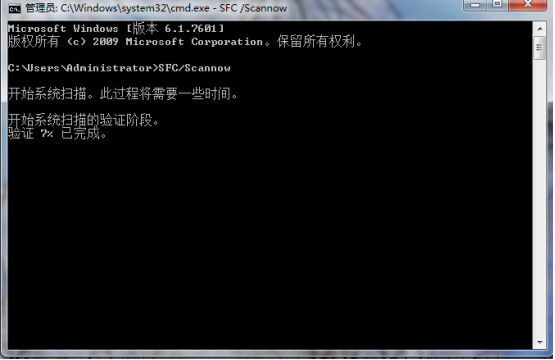
  4. 掃描完成後重新開機生效。

SFC 掃描畫面

若 SFC 無法修復,可嘗試 DISM 指令 (DISM /Online /Cleanup-Image /RestoreHealth) 修復元件存儲,或使用安裝媒體進行就地升級修復。

Copyright © Windows教程網 All Rights Reserved