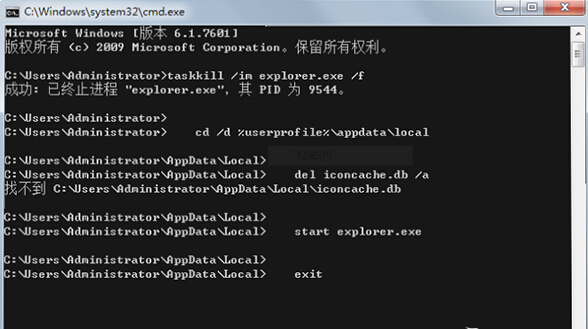
Windows 7 桌面圖示變白底,主因是圖示快取檔 iconcache.db 損毀。透過命令提示字元刪除快取並重啟總管即可修復。
iconcache.db
CMD
taskkill /im explorer.exe /f
cd /d %userprofile%\AppData\Local
del iconcache.db /a
start explorer.exe
exit
指令流程:結束總管 → 刪除快取 → 重啟總管。執行完成後桌面圖示即可恢復正常顯示。
Windows 7 關閉 IPv6 隧道介面:命令列快速清理 ipconfig 輸出雜訊
Win7 常用快捷操作五大絕技:顯示桌面、換壁紙、工作列、開始選單、視窗最大化
系統優化工具一鍵關閉 Win7 服務隱藏風險:哪些服務絕不能關?
Win 7 輸入法圖示消失?快速找回語言列的完整解決方案
Win7 不顯示最小化視窗怎麼解決?任務列消失修復教學
Win7 如何使用 Proxy 代理伺服器上網?IE 區域網路設定手動配置代理 IP
Win7 開機啟動項完整盤點:啟動資料夾、msconfig (system.ini/win.ini/啟動分頁)、登錄 Run、Wininit.ini、DOS 批次檔
Win7 安全憑證錯誤無法安裝?關閉防火牆降低 IE 安全等級嘗試修復