Windows XP Windows 7 Windows 2003 Windows Vista Windows 綜合教學 Linux 系統教學
Windows 10 Windows 8 Windows 2008 Windows NT Windows Server 電腦軟體教學

Win10 郵件與行事曆同步錯誤 0x80c8043e 解決方案:官方 PowerShell 指令與民間移除更新法

編輯:Win10 系統基礎知識

升級 Win10 正式版後,內建「郵件與行事曆」應用程式出現 0x80c8043e 同步錯誤。微軟工程師提供 PowerShell 重新註冊套件方案,民間也發現移除累積更新 KB3081436 有效。本文整理兩種作法供參考。

方案一:PowerShell 重新佈建套件(官方建議)

  1. 以管理員身分開啟 PowerShell。
  2. 執行指令:
    Get-appxprovisionedpackage –online | where-object {$_.packagename –like “*windowscommunicationsapps*”} | remove-appxprovisionedpackage –online
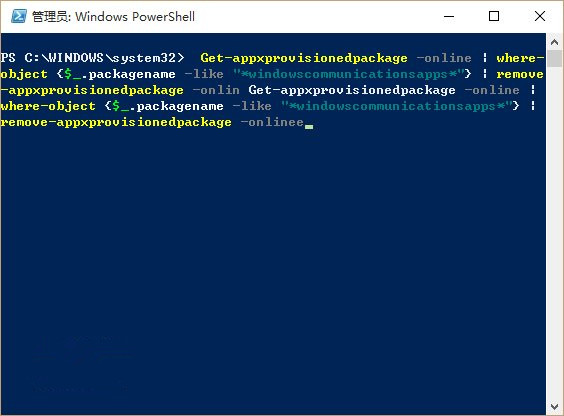
  3. 完成後至 Microsoft Store 重新下載安裝「郵件與行事曆」。

PowerShell 執行畫面

方案二:移除累積更新 KB3081436(民間測試有效)

路徑:「設定」>「更新與安全性」>「進階選項」>「檢視更新歷程記錄」>「解除安裝更新」> 找到 KB3081436 雙擊移除。
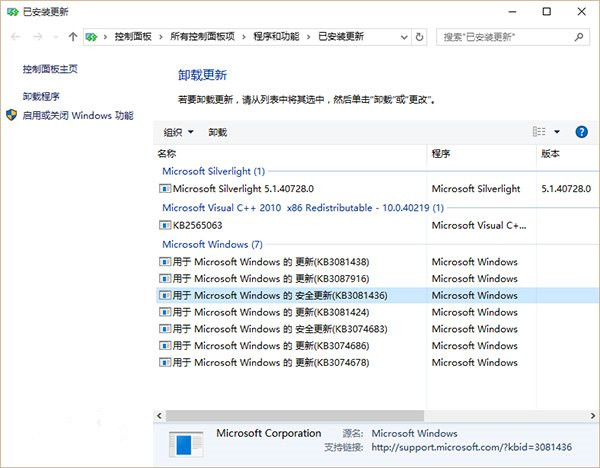
解除安裝更新頁面

KB3081436 項目

⚠ 風險提醒

KB3081436 為安全性更新,移除可能降低系統防護。若已安裝後續更新(如 KB3081438),移除前一版更新風險較低,但若最新更新安裝失敗,建議優先嘗試方案一或等待官方修正補丁。

Copyright © Windows教程網 All Rights Reserved