設定靜態 IP 前需知目前 DNS。提供兩種查詢法,必須在未手動設定 DNS 時查詢才會顯示營運商預設值。
方法一:指令法 (最快)
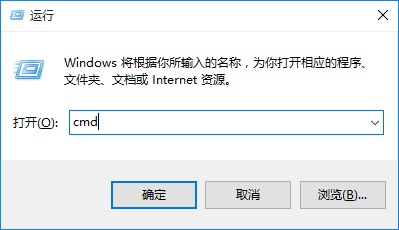
- Win+R →
cmd → Enter
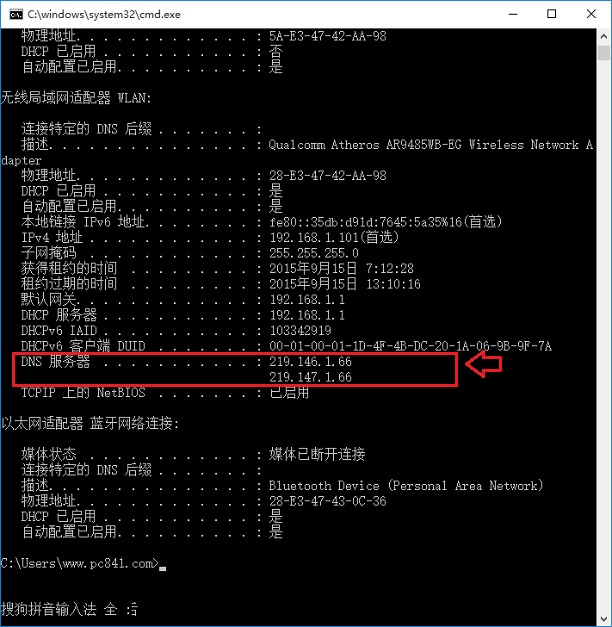
- 輸入
ipconfig /all → Enter
- 找尋「DNS 伺服器」欄位
方法二:介面法
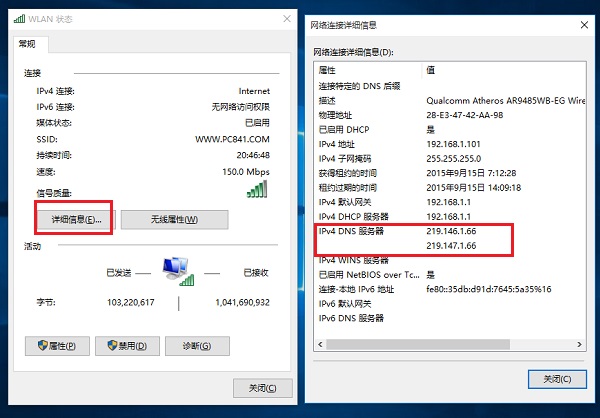
- 右下角網路圖示右鍵 → 「開啟網路與共用中心」
- 點擊已連線介面卡 → 「詳細資料」
- 找尋「DNS 伺服器」

重要提醒
- 已手動設定靜態 IP/DNS 者,查詢結果將為手動設定值,非營運商預設值
- 建議在修改 IP 設定前先查詢並記錄
- 營運商 DNS 通常較穩定,除有特殊需求 (防劫持、解鎖地區限制) 否則建議保持自動取得