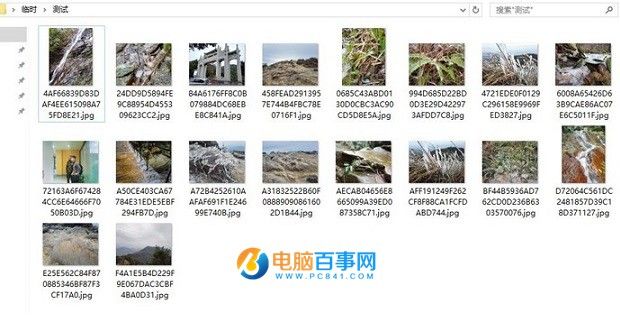
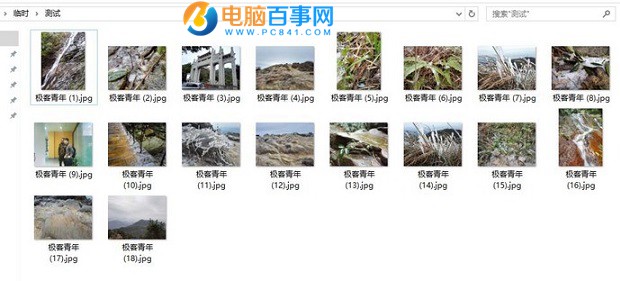
@echo off
for /f "delims=" %%f in ('dir/b/s/a-d *.*') do (
if not "%%~nxf"=="%0" ren "%%f" "極客青年%%~nxf")rename.bat (將「極客青年」換成想要的前綴)。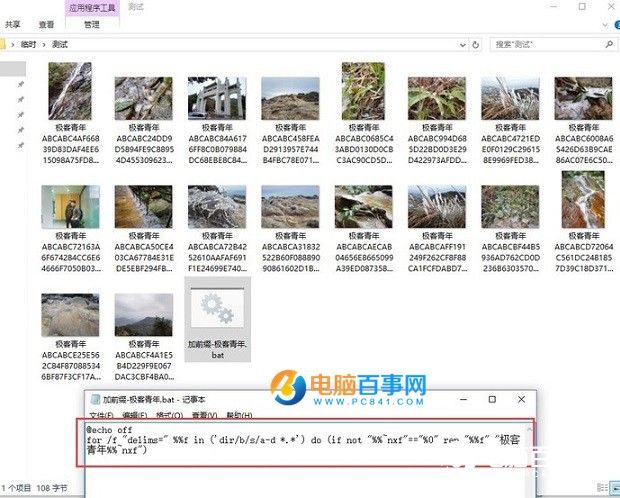
XP/Win7/8/10 全支援。不想裝第三方重命名軟體,這兩招最輕量實用。
Windows 10 正式版 (Build 10240) 最新截圖曝光:RTM 版本鎖定在即
驅動人生下載 Win10 體驗系統並安裝教程:官方論壇純淨 ISO + PE 安裝指導 + 驅動一鍵搞定
Windows 10/8.1 儲存空間功能完整教學:多顆硬碟組成儲存池、鏡像/同位檢查冗余、資料自動修復防丟失
Win10 螢幕閃爍怎麼辦?安全模式停用錯誤回報服務完整解決方案
小馬啟動工具 OEM8 版下載:Win10/Office 2016 一鍵永久啟動 (僅供技術研究)
Windows 10 Build 10061 新功能總覽:郵件行事曆、開始選單與虛擬桌面大幅強化