Windows XP Windows 7 Windows 2003 Windows Vista Windows 綜合教學 Linux 系統教學
Windows 10 Windows 8 Windows 2008 Windows NT Windows Server 電腦軟體教學

Win10 開機按 F8 進不了安全模式?用開機碼修改恢復傳統 F8 選單

編輯:Win10 系統基礎知識

Windows 10 預設移除開機按 F8 進入安全模式功能,需在系統內透過「系統設定」勾選「安全開機」才能進入。若想恢復傳統開機按 F8 呼叫選單,需使用 Windows 10 安裝媒體(USB)進入命令提示字元修改開機設定。
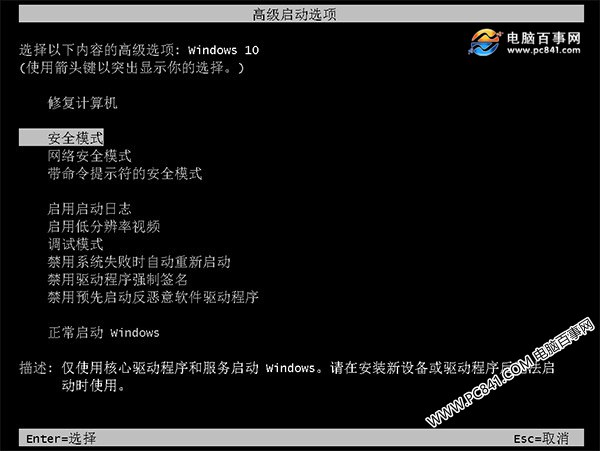

Win10 開機按 F8 進入安全模式
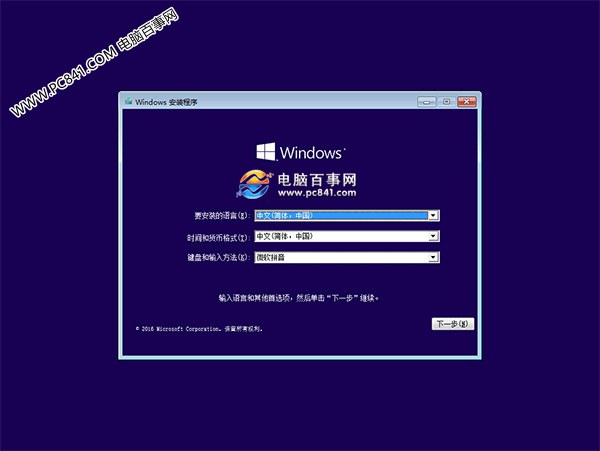
操作步驟

  1. 準備 Windows 10 安裝 USB,設定 BIOS 從 USB 開機。
  2. 進入安裝畫面(語言選擇畫面),**不要點安裝**,直接按 Shift+F10 開啟命令提示字元。
  3. 輸入指令:bcdedit /set {default} bootmenupolicy legacy 按 Enter 執行。
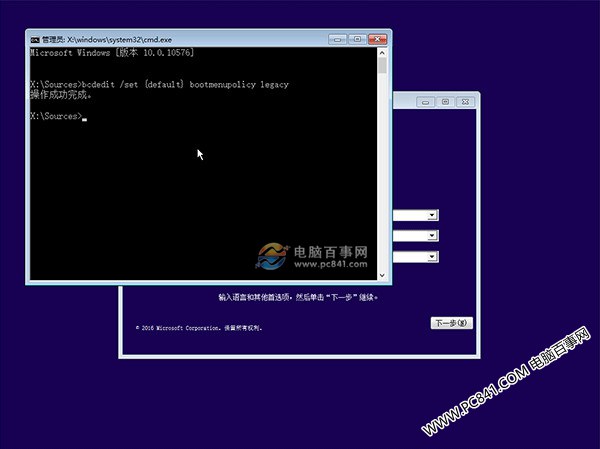
  4. 重新開機、拔除 USB,開機時連續按 F8 即可呼叫傳統安全模式選單。

恢復預設

以系統管理員身分開啟命令提示字元,執行:bcdedit /set {default} bootmenupolicy standard 即可還原預設行為。

Copyright © Windows教程網 All Rights Reserved