Edge 啟動畫面預設藍色 (#0078D7) 單調?登錄修改 BackgroundColor 即可自訂啟動背景色 (支援 RGB 十六進位碼),重開 Edge 即時生效。

regedit 定位:HKEY_CURRENT_USER\SOFTWARE\Classes\LocalSettings\Software\Microsoft\Windows\CurrentVersion\AppModel\SystemAppData\Microsoft.MicrosoftEdge_8wekyb3d8bbwe\SplashScreen\Microsoft.MicrosoftEdge_8wekyb3d8bbwe!MicrosoftEdge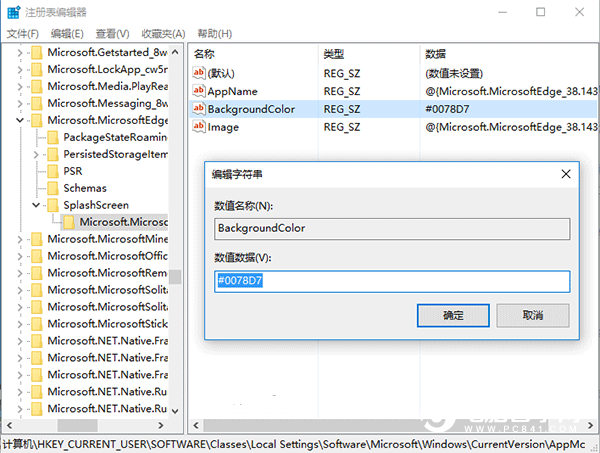
#0078D7#C00000#00B050#FFFF00#E36C09#7030A0其他色碼可搜尋「RGB 色碼表」查詢。改回預設將值改為
#0078D7即可。修改後重啟 Edge 生效。
電腦桌面美化:Winstep Nexus 打造 Mac 風格 Dock + 隱藏工作列/桌面圖示 + 高顏值壁紙
PowerShell 一鍵批量建立資料夾:比 Excel 法更簡單
升級 Win10 後風扇狂轉怎麼辦?將散熱原則改為「被動」降低 CPU 頻率優先
Win10 毛玻璃特效開啟教程:註冊表修改 EnableBlurBehind=1 秒讓開始選單/任務列磨砂透明
Win8.1 升級 Win10 出現 0x80070002 錯誤解決方案:移除非開機磁碟或停用非 Microsoft 服務