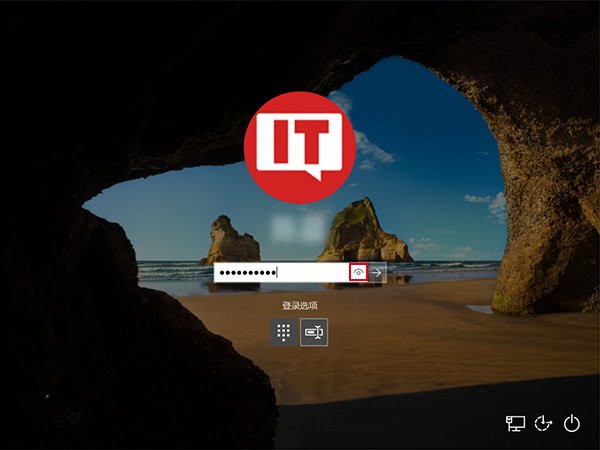
Win10 登入畫面密碼輸入框右側有「顯示明文」眼睛圖示,長按即可看清密碼。雖方便確認輸入,但旁人可趁機偷看。透過登錄新增 DisablePasswordReveal 即可徹底移除此按鈕,犧牲自檢便利換取隱私安全。
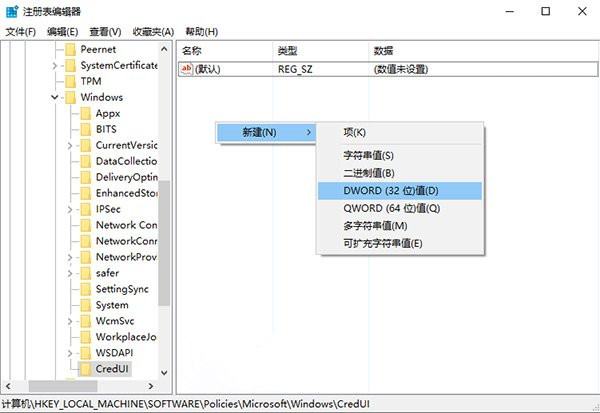
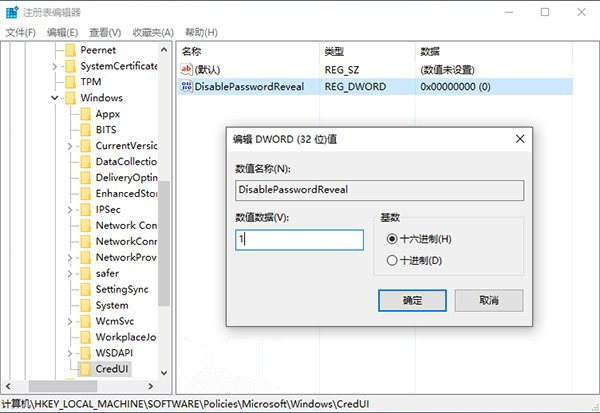
DisablePasswordReveal
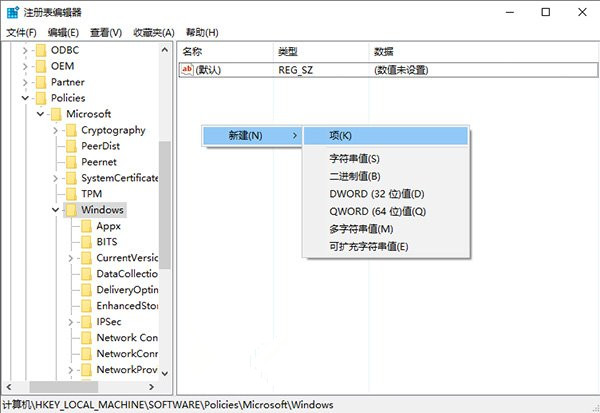
regedit
HKEY_LOCAL_MACHINE\Software\Policies\Microsoft\Windows\
1
若覺得不方便,刪除 DisablePasswordReveal 或改值為 0 即可恢復。此設定屬機器原則,影響所有使用者。
0
Win10 開始選單搜尋卡頓怎麼辦?關閉 Bing 線上搜尋大幅提升回應速度
Win10 時間不準、不同步?完整排查與自動對時設定教學
Windows 10 八大亮點功能深度解析:從 Edge 到 Windows Hello
Win10 Win 鍵組合鍵大全:40+ 快捷鍵讓操作事半功倍
Win10 磁碟使用率 100% 解決方案總匯:六大優化手段從服務到硬體升級
Win10 右鍵選單過長臃腫?用 360 安全衛士輕鬆瘦身清理
Windows 無線服務未執行導致無法連 Wi-Fi?啟用 WLAN AutoConfig 服務完整教學
Win10 字型怎麼安裝?單一安裝與批量安裝兩種方法圖文教學