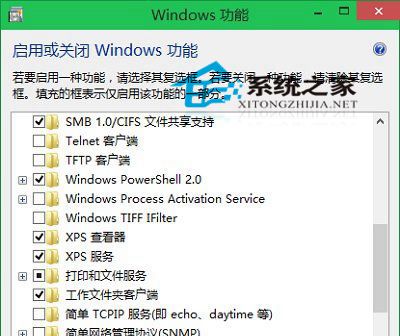
Win10 可關閉不需要的 Windows 功能元件(如舊版 .NET、列印服務、Windows PowerShell 2.0 等)以精簡系統:
關閉非必要元件可減少攻擊面、釋放少量資源,但請確認不影響相依軟體運作再操作。
Win10 Modern 介面開啟高對比度模式:輕松使用設定三步驟
Windows 10 清除檔案總管「主頁」最近使用檔案與常用資料夾:設定法與註冊表法
Win10 滑鼠無法開啟右側邊欄?同解法:Win+C 熱鍵或點擊通知圖示
Win10 藍畫面 DPC_WATCHDOG_VIOLATION (0x133) 完整修復指南:SATA AHCI 驅動程式衝突解決
Win10 透過註冊表更換鎖定畫面預設壁紙(登入前)
IDC預測:2019年Win10 Mobile份額僅增至3.6% 仍屬邊緣玩家
MacBook Pro 安裝 Win10 無聲音?硬體不支援無解,建議回 macOS 或裝 Win7
Win10 登入密碼忘記怎麼辦?Microsoft 帳號重設密碼完整教學