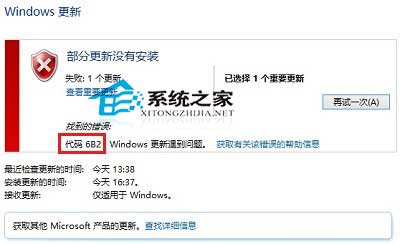
微軟拼音詞庫更新時出現錯誤代碼 0x800706B2,官方建議(新增英文輸入法設為預設再刪除中文)經測試無效。
此問題屬於系統更新機制 Bug,建議等待微軟修復或採用上述替代方案。
Windows 10 檔案總管導覽窗格收藏夾消失找回教學
Win10 Office 安全模式啟動完整教學 兩種方法任選
如何用電腦存取 Win10 手機系統盤?建立 C: 捷徑複製到手機儲存區即可
Win10 升級 10159 失敗解決:Microsoft 帳號驗證、修復我功能、快速通道切換三大對策
Win10 記憶體佔用持續飆升至 100%?註冊表停用 TimeBroker 與 SysMain 緩解洩漏
Win10 開啟「網路連線」兩大法:執行 ncpa.cpl、Win+X 系統快捷選單
Win10 查看系統事件記錄:事件檢視器分析應用程式、安全性、系統錯誤日誌
Opera瀏覽器Win10版已提交商店審核:最快明日上架